

Background color
Tint chosen bars with bgcolor(): conditional backgrounds, transparency, offsets, and how it behaves on the price pane and in a script's own pane.
bgcolor paints a vertical stripe behind a bar, the full height of the pane. Used on a run of bars, it highlights a period: a trading session, a regime where the trend is up, the bars where a condition holds. It is the quickest way to make "when" visible at a glance.
#Highlight bars that meet a condition
Give bgcolor a color on the bars you want tinted and na on the others:
//@chartscript 1
indicator("Trend regime", { overlay: true })
const len = input.int(100, "Trend length", { minval: 2 })
const avg = ta.ema(close, len)
plot(avg, "Trend average", color.muted, 2)

// faint green while price holds above the average, faint red below
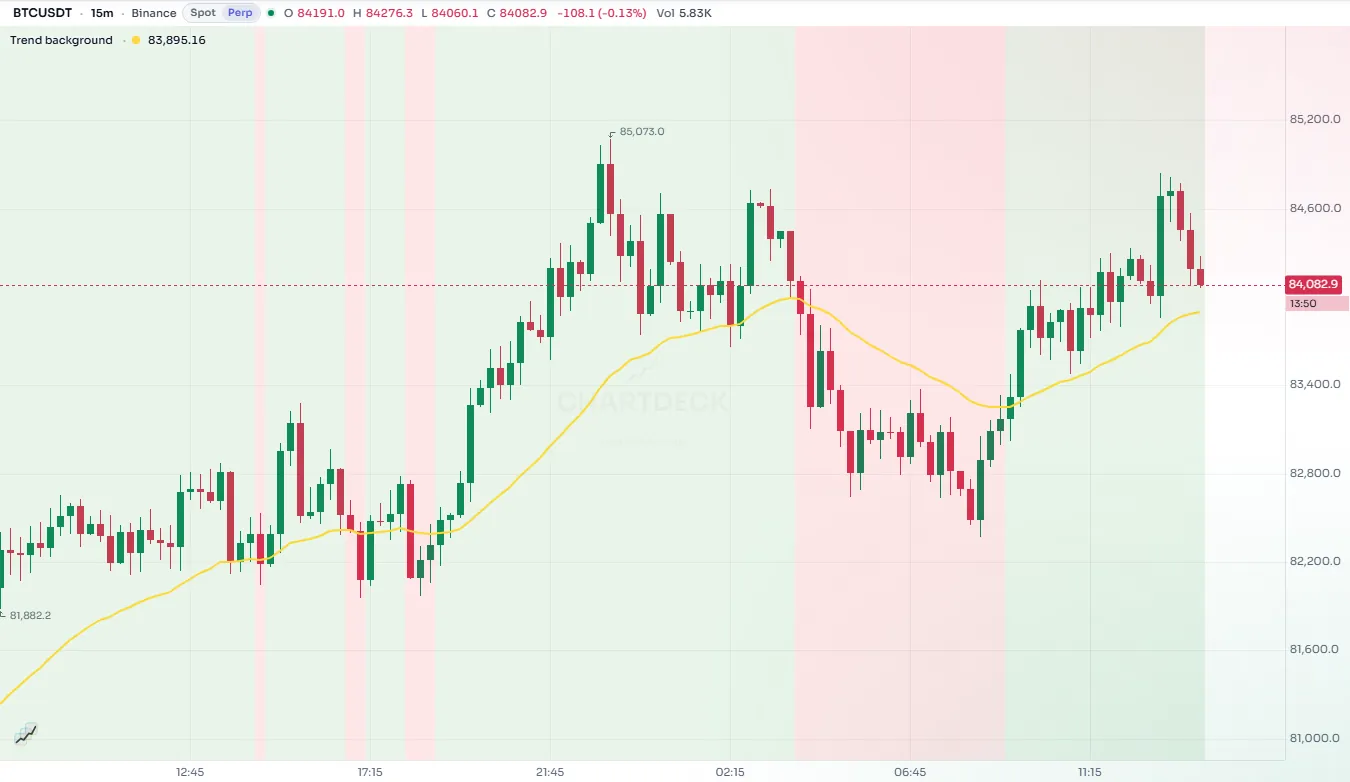
bgcolor(close > avg ? color.new(color.up, 90) : color.new(color.down, 90), { title: "Regime" })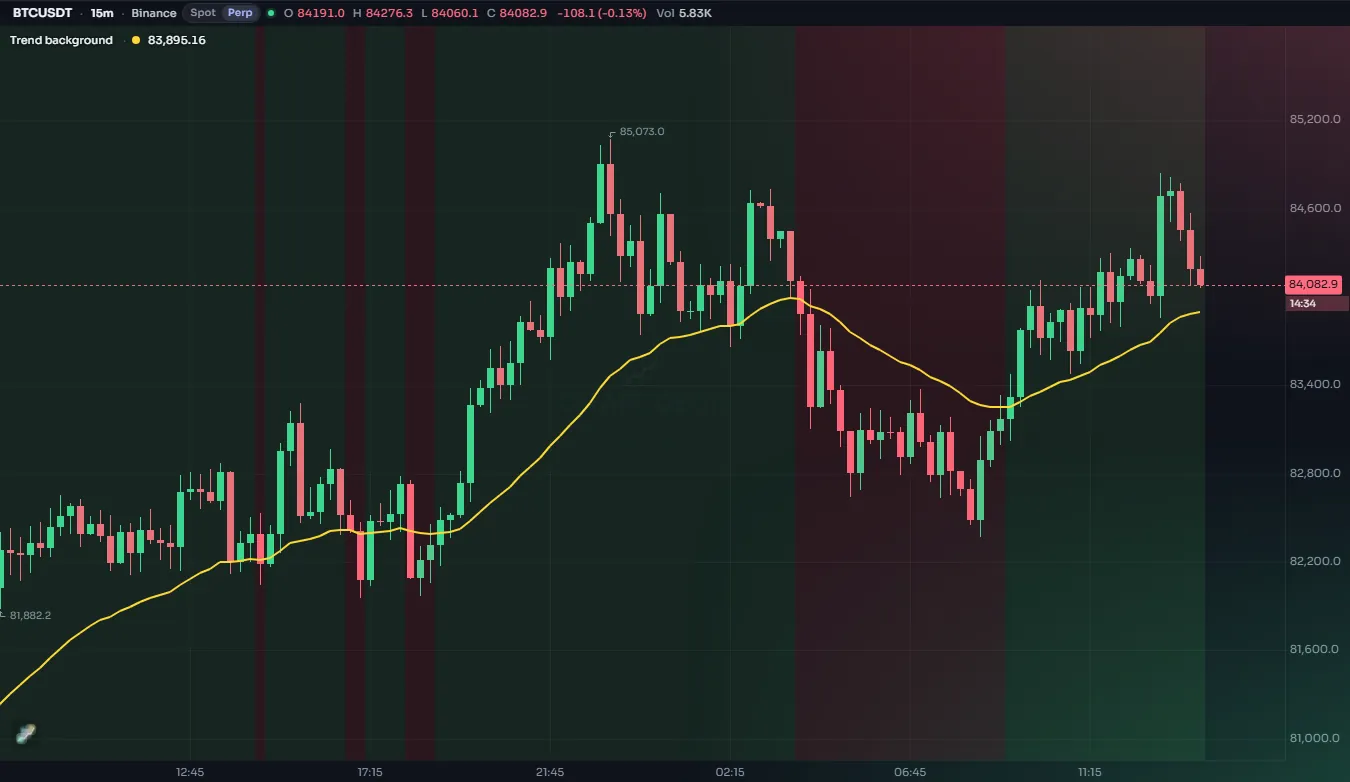
| Argument | What it does | Default |
|---|---|---|
color | The tint on this bar. na leaves the bar untinted. | required |
offset | Shift the tint this many bars right (negative: left) | 0 |
title | The name in the Style tab | "" |
display | display.all or display.none (may be an input) | display.all |
show_last | Tint only the last N bars | all bars |
editable, force_overlay, format and precision are accepted for compatibility and change nothing.
#Transparency matters most here
A background covers the whole height of the pane, and on the price pane it is laid over the candles as a see-through layer, so even a mild color dominates the chart. Keep backgrounds very transparent: 85 to 95 with color.new is a good starting point over price, and theme colors (color.up, color.down, color.accent, color.muted) keep the tint sensible on both dark and light charts. See Colors.
The user can also change the opacity of each background in the Style tab.
#Only some bars
Because na means "no tint", any condition works as a filter. This script tints only the bars with unusually high volume:
//@chartscript 1
indicator("Heavy volume bars", { overlay: true })
const mult = input.float(2.0, "Times the average", { minval: 1, step: 0.1 })
const heavy = volume > ta.sma(volume, 20) * mult
bgcolor(heavy ? color.new(color.orange, 85) : na, { title: "Heavy volume" })
A background by time of day is just as easy. This one marks a window of hours (in UTC):
//@chartscript 1
indicator("Hours window", { overlay: true })
const fromHour = input.int(13, "From hour (UTC)", { minval: 0, maxval: 23 })
const toHour = input.int(17, "To hour (UTC)", { minval: 1, maxval: 24 })
const h = hour(time, "UTC")
bgcolor(h >= fromHour && h < toHour ? color.new(color.accent, 92) : na, { title: "Window" })
For trading sessions with their own definitions, see Sessions.
#Several backgrounds
A script may call bgcolor more than once. Each call is its own output with its own entry in the Style tab, so users can switch them separately. Where two tints fall on the same bar, both are painted, the later one on top.
const rsi = ta.rsi(close, 14)
bgcolor(rsi > 70 ? color.new(color.down, 88) : na, { title: "Overbought" })
bgcolor(rsi < 30 ? color.new(color.up, 88) : na, { title: "Oversold" })#On the price or in its own pane
bgcolor tints the pane its script lives in.
- In a script with
overlay: true, that is the price pane: the tint covers the candles' area, and the candles show through it as long as the color is transparent enough. - In a script with its own pane (
overlay: false), only that pane is tinted. The price chart above is untouched.
An oscillator in its own pane can use a background to show where it is extreme, without touching the price chart:
//@chartscript 1
indicator("Stochastic zones", { overlay: false })
const k = ta.sma(ta.stoch(close, high, low, 14), 3)
plot(k, "%K", color.accent, 2)
hline(80, "Upper", color.muted, hline.style_dashed)
hline(20, "Lower", color.muted, hline.style_dashed)
bgcolor(k > 80 ? color.new(color.down, 85) : k < 20 ? color.new(color.up, 85) : na, { title: "Extreme" })
To tint the price pane from a script that has its own pane, split it into two scripts: one overlay script for the background and one pane script for the oscillator.
#Offset
offset shifts the tint sideways like a plot's offset. A common use is to tint the bar where a pivot actually happened, which is only known some bars later:
const span = 5
const isPivotHigh = !na(ta.pivothigh(high, span, span))
bgcolor(isPivotHigh ? color.new(color.down, 80) : na, { offset: -span, title: "Pivot high bar" })#Background or something else?
| You want to show | Use |
|---|---|
| A period of time, a regime | bgcolor |
| A single event on a bar | A mark: Text and shapes |
| The space between two lines | Fills |
| The direction of each candle itself | Bar coloring |
| An area bounded in price as well as time | A box: Drawings |