

Drawings
Labels, lines, boxes, polylines and line fills drawn from code: creating, updating with setters, deleting, coordinates, extend, caps and keeping them fast.
Plots, fills and shapes are outputs: one value per bar, declared once at the top of the script. Drawings are different. A drawing is an object you create from your code, at any bar and any price, whenever you like: inside an if, in a loop, in a function. Once created it stays on the chart until you delete it or the script makes too many of its kind, and you can move it, recolor it or change its text at any time.
That makes drawings the right tool for things that are not "a value on every bar": a label on each pivot with its price, a trend line between two swing points, a box around a range, a path through a list of points.
| Type | Draws | Create with |
|---|---|---|
label | Text in a bubble, or a small shape, at one point | label.new |
line | A straight line between two points, optionally extended | line.new |
box | A rectangle between two bars and two prices, optionally with text | box.new |
polyline | A line through many points, straight or curved, open or closed | polyline.new |
linefill | The area between two lines | linefill.new |
Tables are drawing objects too; they have their own page: Tables.
#Labels and lines
This script labels every swing high and low with its price and joins the two most recent swing highs with a line that extends to the right:
//@chartscript 1
indicator("Swing labels", { overlay: true, max_labels_count: 200 })
const span = input.int(5, "Bars each side", { minval: 1 })

const ph = ta.pivothigh(high, span, span)
const pl = ta.pivotlow(low, span, span)

state lastHigh: float = na
state lastHighBar: int = na
state trend: line = na

if (!na(ph)) {
    label.new(
        bar_index - span,
        ph,
        str.tostring(ph, format.mintick),
        { style: label.style_label_down, color: color.new(color.down, 25), textcolor: color.white, size: size.small }
    )
    // join this swing high to the previous one
    if (!na(lastHigh)) {
        line.delete(trend)
        trend = line.new(
            lastHighBar,
            lastHigh,
            bar_index - span,
            ph,
            { extend: extend.right, color: color.muted, style: line.style_dashed }
        )
    }
    lastHigh = ph
    lastHighBar = bar_index - span
}

if (!na(pl)) {
    label.new(
        bar_index - span,
        pl,
        str.tostring(pl, format.mintick),
        { style: label.style_label_up, color: color.new(color.up, 25), textcolor: color.white, size: size.small }
    )
}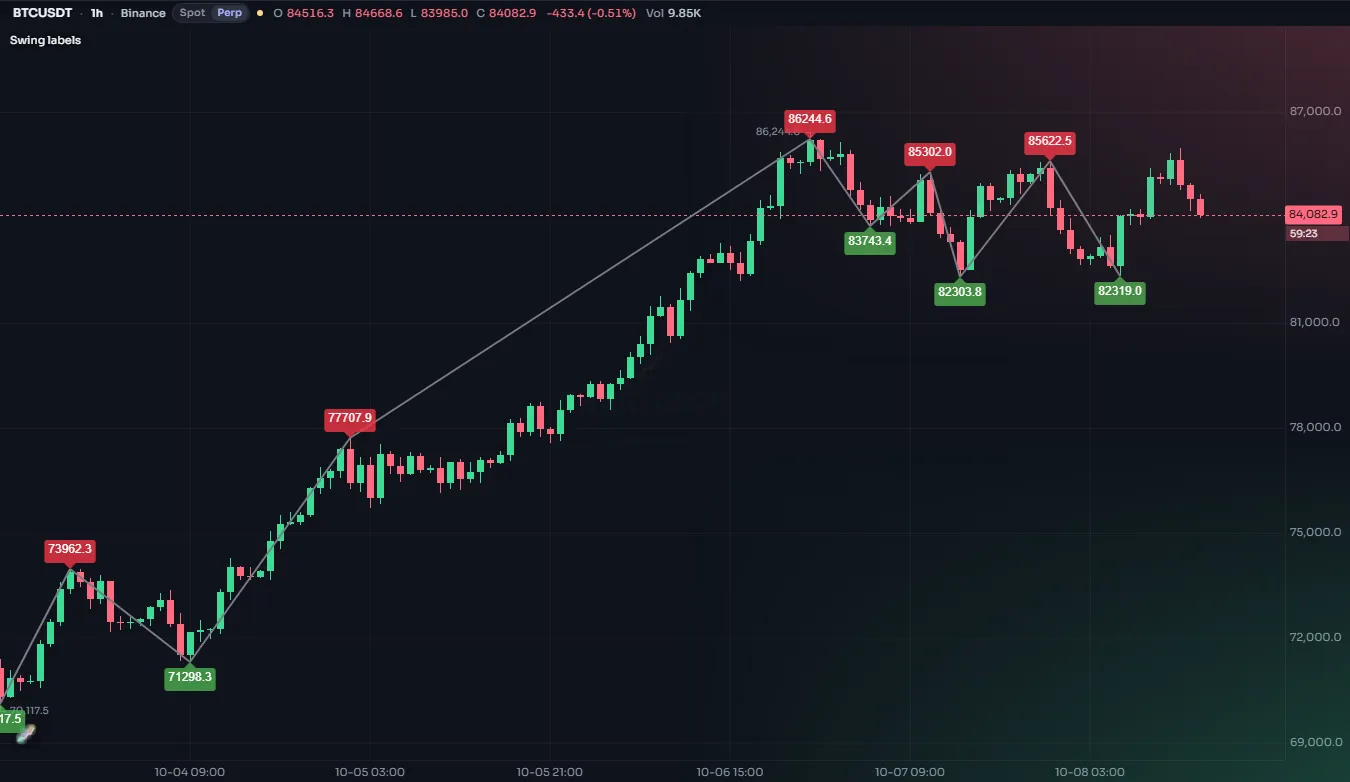
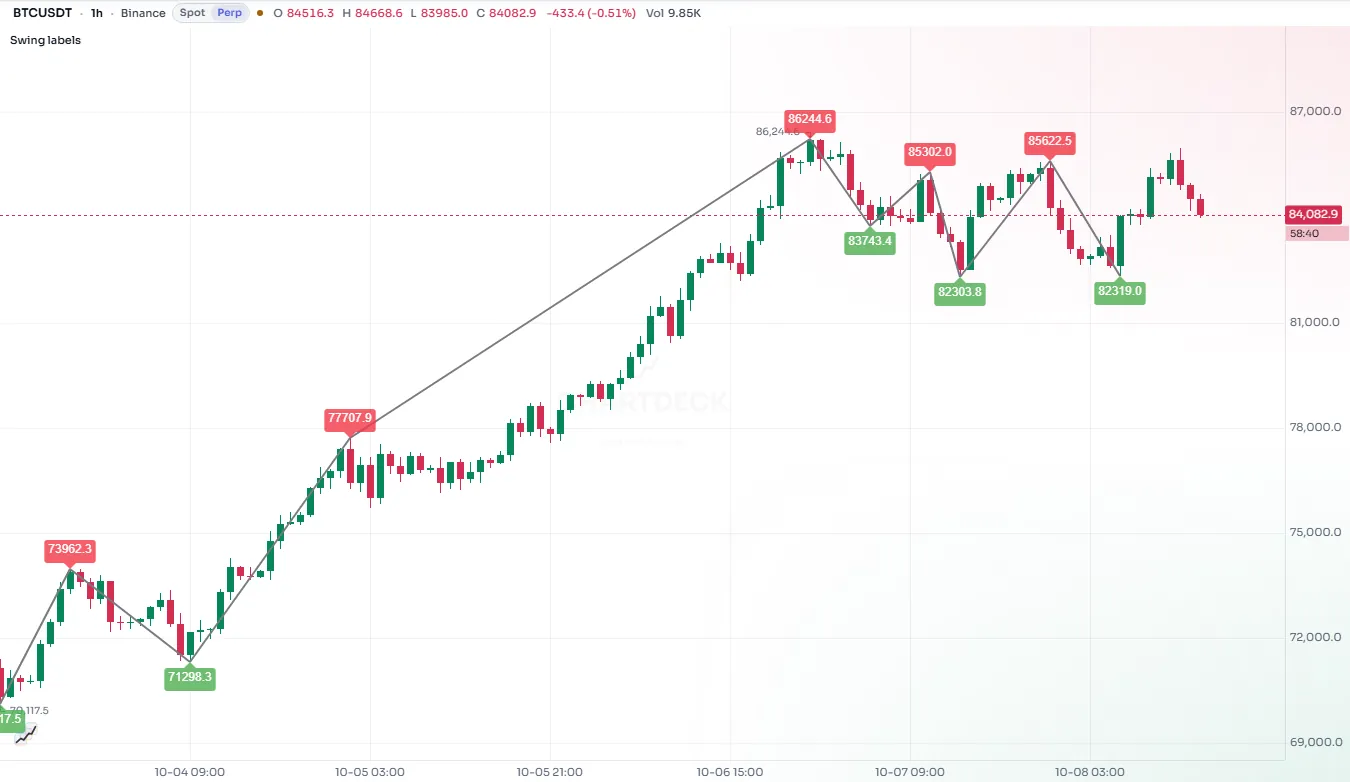
A few things to notice:
- The pivot is confirmed
spanbars after it happened, so the label goes atbar_index - span, back on the bar that made the high. - The trend line is kept in a
statevariable. Each new swing high deletes the old line and draws a new one, so there is only ever one. max_labels_count: 200inindicator()lets the script keep 200 labels instead of the default 50.
#Coordinates
Every drawing is placed with an x (where along the time axis) and a y (a price).
x is a bar index by default (xloc: xloc.bar_index): bar_index is the current bar, bar_index - 10 ten bars back, bar_index + 5 five bars into the future. With xloc: xloc.bar_time, x is a time in milliseconds instead, such as time or time_close. Times are handy when you know when something happened rather than how many bars ago.
A drawing may extend past the last bar into the empty space on the right; ChartDeck draws it there using the chart's bar spacing.
y is a price on the script's scale. For labels, yloc can override it:
yloc | The label sits |
|---|---|
yloc.price | At the y you gave (the default) |
yloc.abovebar | Above the bar's high (y is ignored) |
yloc.belowbar | Below the bar's low (y is ignored) |
#Chart points
A chart.point holds both kinds of x (a time and a bar index) plus a price. Every constructor accepts points instead of separate numbers, and polylines need them:
| Function | Makes a point at |
|---|---|
chart.point.now(price) | The current bar |
chart.point.from_index(index, price) | A bar index |
chart.point.from_time(time, price) | A time |
chart.point.new(time, index, price) | Both (either x may be na) |
if (barstate.islast) {
    const a = chart.point.from_index(bar_index - 20, low[20])
    const b = chart.point.now(close)
    line.new(a, b, { color: color.accent, width: 2 })
}#Create once, then update
A script runs once on every bar. If you call label.new on every bar, you get a new label on every bar, which is rarely what you want and slow besides. For a drawing that should exist once, such as a line at the current price or a label with the latest reading, declare it with state and change it with setters:
//@chartscript 1
indicator("Distance to the average", { overlay: true })
const len = input.int(50, "Length", { minval: 1 })
const avg = ta.sma(close, len)
plot(avg, "Average", color.muted)

// created once, on the first bar; moved and rewritten on later bars
state tag: label = label.new(
    na,
    na,
    "",
    { style: label.style_label_left, color: color.new(color.accent, 20), textcolor: color.white, size: size.small }
)
state link: line = line.new(na, na, na, na, { color: color.accent, style: line.style_dotted })

if (barstate.islast) {
    const pct = (close - avg) / avg * 100
    tag.set_xy(bar_index + 2, close)
    tag.set_text(str.tostring(pct, "#.##") + " % from the average")
    link.set_xy1(bar_index, avg)
    link.set_xy2(bar_index, close)
}
Updating on barstate.islast only is the cheapest pattern of all: the work happens once on history and then on each live update. Setters can be called as functions (label.set_text(tag, "...")) or as methods (tag.set_text("...")); they do the same thing.
Getters read a drawing back: label.get_text, label.get_x, label.get_y, line.get_x1, line.get_y2, box.get_top and so on. line.get_price gives the price of a line at any bar index, which is how you test whether the price has crossed a trend line.
#Labels
label.new takes x, y and text, then the style arguments:
| Argument | What it does | Default |
|---|---|---|
style | The label's shape (see below) | label.style_label_down |
color | The bubble or shape color | blue |
textcolor | The text color | white |
size | size.tiny ... size.huge, or size.px(n) / size.pt(n) / size.rel(x) | size.normal |
textalign | text.align_left, text.align_center, text.align_right | center |
tooltip | Text shown when the pointer hovers over the label | none |
text_font_family | font.family_default or font.family_monospace | default |
text_formatting | text.format_bold, text.format_italic, or both added | none |
Label styles fall into three groups:
- Bubbles with a pointer at the point:
label.style_label_down(bubble above, pointing down),label.style_label_up,label.style_label_left,label.style_label_right,label.style_label_lower_left,label.style_label_lower_right,label.style_label_upper_left,label.style_label_upper_right, andlabel.style_label_center(no pointer). - Shapes drawn at the point:
label.style_circle,label.style_square,label.style_diamond,label.style_cross,label.style_xcross,label.style_flag,label.style_triangleup,label.style_triangledown,label.style_arrowup,label.style_arrowdown. - Text only:
label.style_none(plain text) andlabel.style_text_outline(text with an outline that stays readable over candles).
Text in labels is always plain text. \n starts a new line.
#Lines
line.new takes two points (x1, y1, x2, y2, or two chart points) and these style arguments:
| Argument | Values | Default |
|---|---|---|
extend | extend.none, extend.right, extend.left, extend.both | extend.none |
color | Any color | blue |
style | line.style_solid, line.style_dashed, line.style_dotted, line.style_arrow_right, line.style_arrow_left, line.style_arrow_both, or a dash pattern of your own with dash.custom | solid |
width | Pixels | 1 |
dash.custom(5, 3) draws 5 pixels, leaves 3 and repeats; give up to eight lengths for a dash-dot pattern (dash.custom(8, 2, 2, 2)). It works for a box's border_style and a polyline's line_style too, and it is how the official scripts draw exactly the dashes of ChartDeck's built-in indicators.
extend.right turns a segment into a ray that continues past its second point to the edge of the chart, which is what you want for trend lines and support levels. extend.both gives an infinite line.
#Boxes
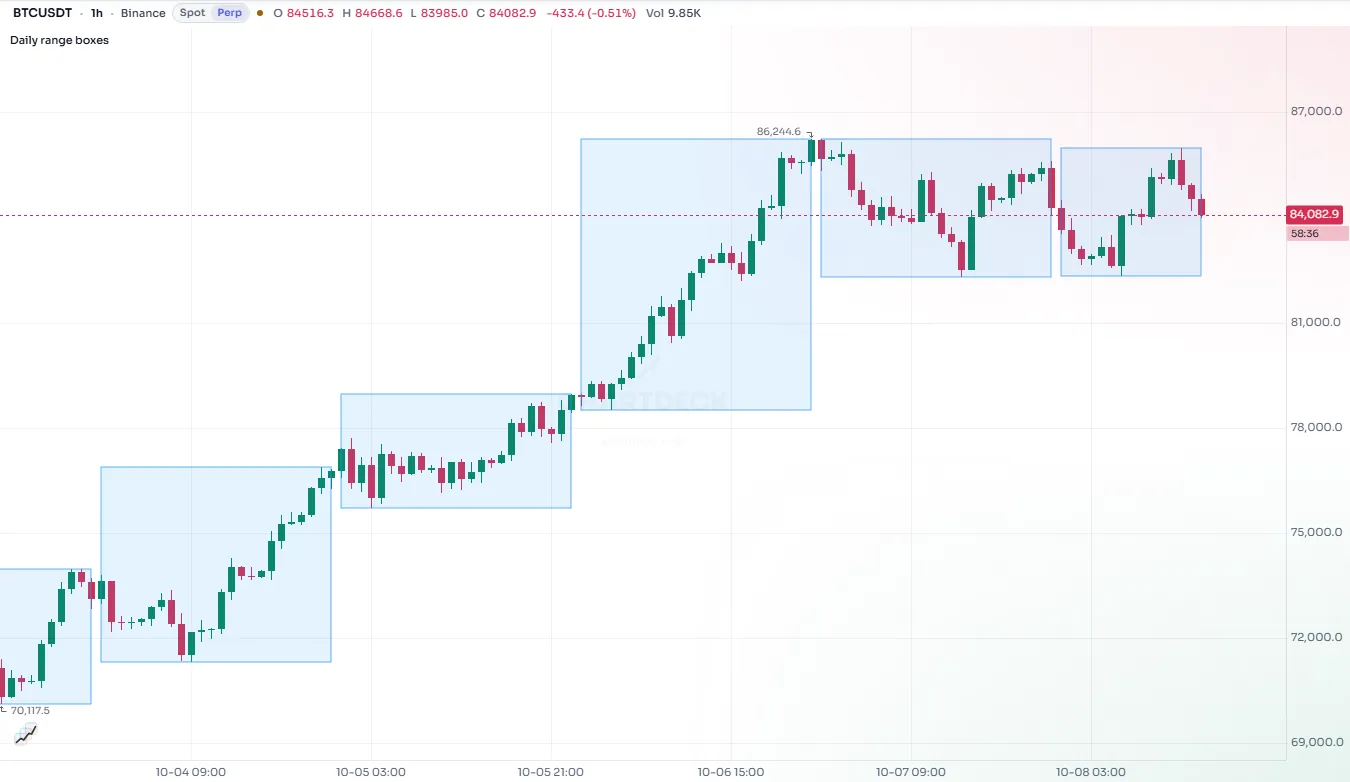
box.new takes left, top, right, bottom (or a top-left and a bottom-right chart point). This script boxes every three-bar price gap, where a bar's low is above the high two bars earlier (or the mirror for a gap down):
//@chartscript 1
indicator("Price gaps", { overlay: true, max_boxes_count: 150 })
const reach = input.int(15, "Box length (bars)", { minval: 1 })

if (low > high[2]) {
    box.new(
        bar_index - 2,
        low,
        bar_index + reach,
        high[2],
        {
            border_color: color.new(color.up, 50),
            bgcolor: color.new(color.up, 85),
            text: "gap up",
            text_color: color.up,
            text_size: size.tiny,
            text_halign: text.align_right
        }
    )
}
if (high < low[2]) {
    box.new(
        bar_index - 2,
        low[2],
        bar_index + reach,
        high,
        {
            border_color: color.new(color.down, 50),
            bgcolor: color.new(color.down, 85),
            text: "gap down",
            text_color: color.down,
            text_size: size.tiny,
            text_halign: text.align_right
        }
    )
}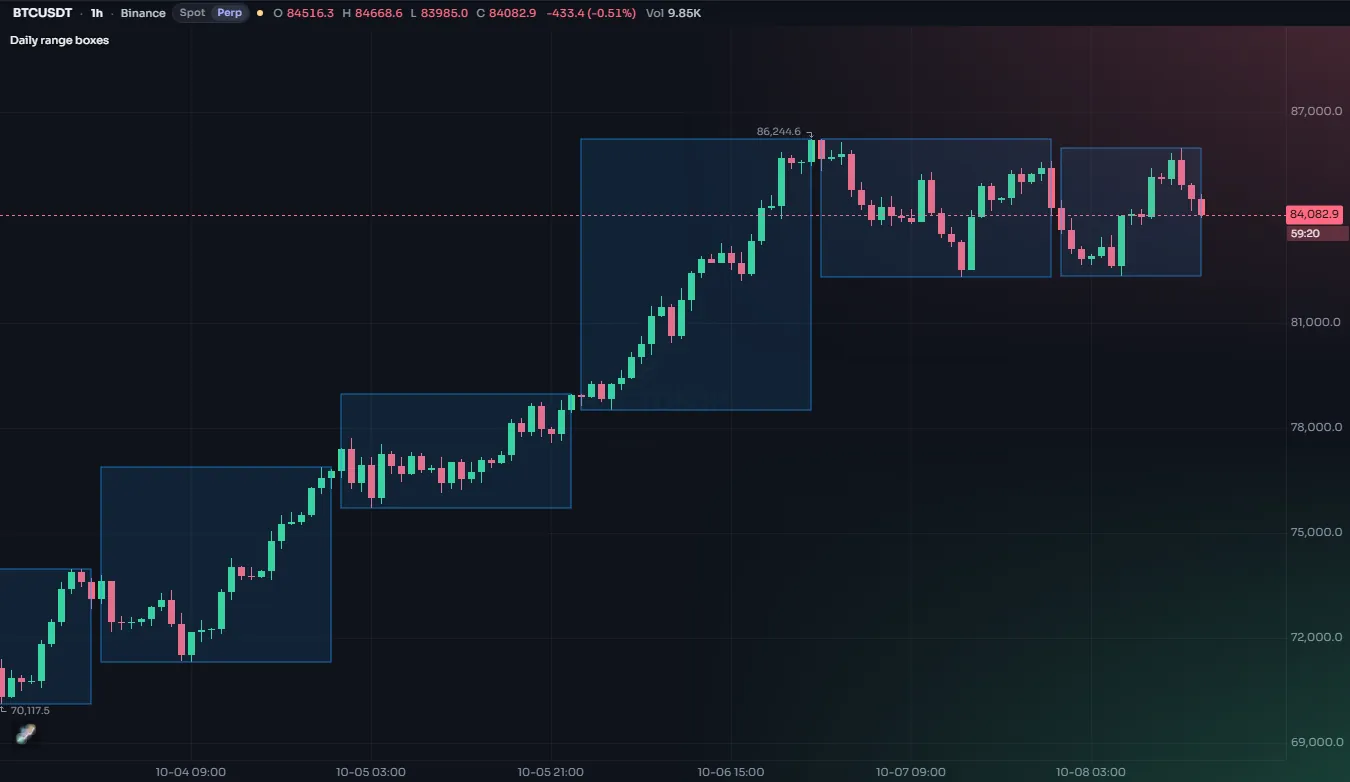
| Argument | What it does |
|---|---|
border_color, border_width, border_style | The outline (line.style_* for the style) |
bgcolor | The fill color |
extend | extend.right / left / both stretches the box sideways to the chart edge |
text, text_color, text_size | Text inside the box |
text_halign, text_valign | text.align_left / center / right, text.align_top / center / bottom |
text_wrap | text.wrap_auto wraps long text to the box width; text.wrap_none does not |
Boxes are drawn blue with a blue fill unless you say otherwise, so set bgcolor (and usually make it very transparent).
#Polylines
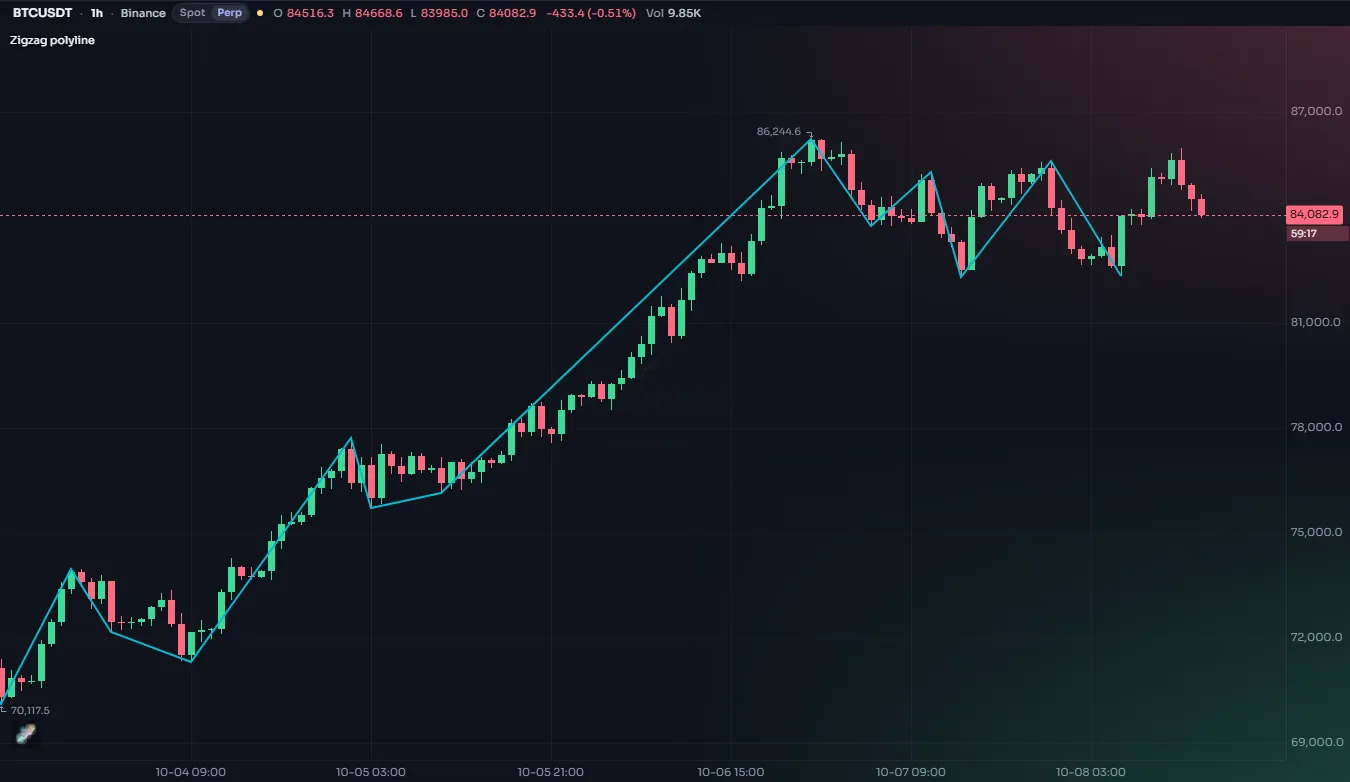
A polyline joins a whole array of chart points in one object, up to 10,000 points. It is the efficient way to draw a zig-zag, a projected path or any shape with many corners: one polyline replaces hundreds of lines.
//@chartscript 1
indicator("Zig-zag", { overlay: true })
const span = input.int(8, "Bars each side", { minval: 2 })
const ph = ta.pivothigh(high, span, span)
const pl = ta.pivotlow(low, span, span)

state points = array.new<chart.point>()
if (!na(ph)) {
    points.push(chart.point.from_index(bar_index - span, ph))
}
if (!na(pl)) {
    points.push(chart.point.from_index(bar_index - span, pl))
}
// keep the last 60 turns
if (points.size() > 60) {
    points.shift()
}

state path: polyline = na
if (barstate.islast) {
    polyline.delete(path)
    path = polyline.new(points, { line_color: color.accent, line_width: 2 })
}
| Argument | What it does | Default |
|---|---|---|
points | An array<chart.point> | required |
curved | Draw a smooth curve through the points instead of straight segments | false |
closed | Join the last point back to the first | false |
line_color, line_style, line_width | The line | blue, solid, 1 |
fill_color | Fill the shape (useful with closed: true) | none |
xloc | Whether the points' bar index or time is used | xloc.bar_index |
A polyline cannot be changed after it is made; to update it, delete it and make a new one, as above.
#Line fills
linefill.new fills the area between two existing lines. It follows the lines when they move, and it disappears when either line is deleted.
//@chartscript 1
indicator("Recent range", { overlay: true })
const len = input.int(30, "Bars", { minval: 2 })
state top: line = line.new(na, na, na, na, { color: color.down, extend: extend.right })
state bottom: line = line.new(na, na, na, na, { color: color.up, extend: extend.right })
state zone: linefill = linefill.new(top, bottom, color.new(color.muted, 88))

// ta.* calls belong outside the if, so they see every bar
const hi = ta.highest(high, len)
const lo = ta.lowest(low, len)
if (barstate.islast) {
    top.set_xy1(bar_index - len + 1, hi)
    top.set_xy2(bar_index, hi)
    bottom.set_xy1(bar_index - len + 1, lo)
    bottom.set_xy2(bar_index, lo)
}#Deleting and listing
label.delete(id), line.delete(id), box.delete(id), polyline.delete(id) and linefill.delete(id) remove a drawing. Deleting na is allowed and does nothing, which keeps code like line.delete(trend) simple on the first pass.
label.all, line.all, box.all, polyline.all and linefill.all are arrays of every drawing of that kind the script still has, oldest first. They make a clean-up easy:
// start fresh on the last bar: remove every label made so far
if (barstate.islast) {
    for (const lb of label.all) {
        lb.delete()
    }
    label.new(bar_index, high, "Now", { yloc: yloc.abovebar })
}
copy (for example line.copy(id)) makes an independent duplicate you can then move.
#How many drawings a script keeps
Each kind has a budget. When the script creates one more than the budget allows, the oldest drawing of that kind is removed automatically. This is usually what you want: a script that labels every pivot shows the most recent ones.
| Kind | Default | Most you can ask for | Set with |
|---|---|---|---|
| Labels | 50 | 1,000 | indicator(..., { max_labels_count: N }) |
| Lines | 50 | 1,000 | max_lines_count: N |
| Boxes | 50 | 1,000 | max_boxes_count: N |
| Polylines | 50 | 500 | max_polylines_count: N |
| Line fills | 500 | ||
| Tables | 50 | see Tables |
Ask only for what you need. Every drawing costs memory and drawing time on every frame, and a chart with a thousand labels is hard to read anyway.
#Keeping drawings fast
- Create once, update after. Use
stateand setters for drawings that should exist once, as in Create once, then update. - Do the work on the last bar. Things that only matter now (a projection, a summary label, a zig-zag) can wait for
if (barstate.islast). - Use one polyline instead of many lines for any path with many corners.
- Let the budget work for you. You do not need to delete old drawings yourself; the oldest go first when the budget is full.
#Live bars
While a bar is still forming, the script runs again on every update. Anything an update does to drawings (creating, changing, deleting) is undone before the next update of the same bar, and only the run at the bar's close sticks. So a label.new on a live bar does not pile up one label per tick: you always see the result of the latest update. See the execution model for the full story.
#Named styles for drawings
The constructors accept look = with a style made by style.label, style.line or style.box. Every drawing that uses the same look can then be restyled by the user in one place, in the Style tab. The Style tab also has a switch that hides all of a script's labels, lines, boxes and tables at once. Their colors are also listed on the Colors tab, so the color presets reach them, and the size of their text follows the Labels & text tab, where a text style gets a row of its own. Drawings made without a look follow that tab too: its size switch (Tiny to Extra-large), font and dimming apply to every label, box and table of the script. See the settings dialog.
const swing = style.label("Swing labels", { color: color.muted })
const ph = ta.pivothigh(high, 5, 5)
if (!na(ph)) {
    label.new(bar_index - 5, ph, "H", { look: swing })
}