

Fills
Shade the space between two plots or two levels with fill(), with one color, a color per bar, or a vertical gradient.
A fill shades the space between two lines. It turns a pair of bands into a channel you can read at a glance, shows whether a fast average sits above or below a slow one, and marks the overbought and oversold zones of an oscillator.
fill does not take values. It takes two handles: the results of two plot calls, or of two hline calls. That is why you keep the result of a plot in a variable when you plan to fill against it.
#Filling between two plots
//@chartscript 1
indicator("Keltner-style channel", { overlay: true })
const len = input.int(20, "Length", { minval: 1 })
const mult = input.float(2.0, "ATR multiplier", { minval: 0.1, step: 0.1 })

const mid = ta.ema(close, len)
const width = ta.atr(len) * mult

const upper = plot(mid + width, "Upper", color.accent)
plot(mid, "Middle", color.new(color.accent, 50))
const lower = plot(mid - width, "Lower", color.accent)
fill(upper, lower, color.new(color.accent, 90), "Channel")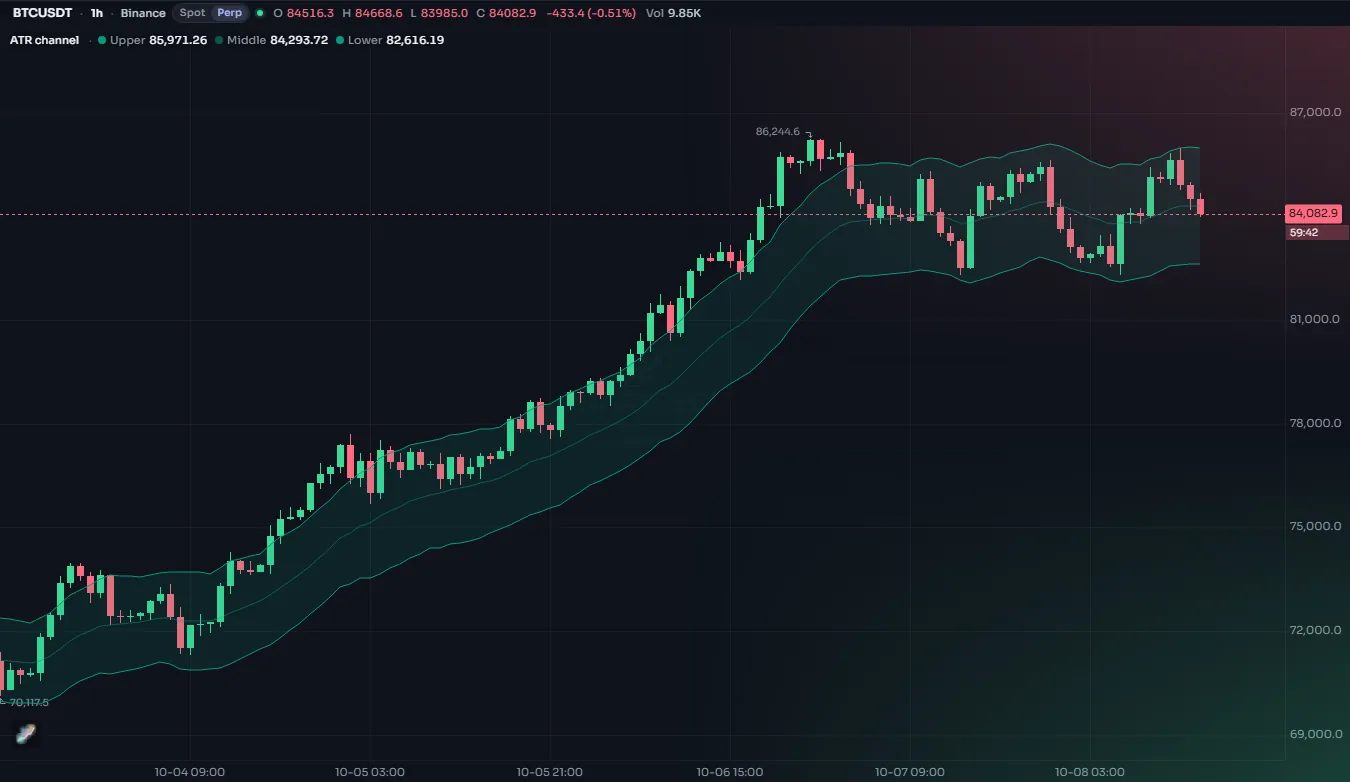
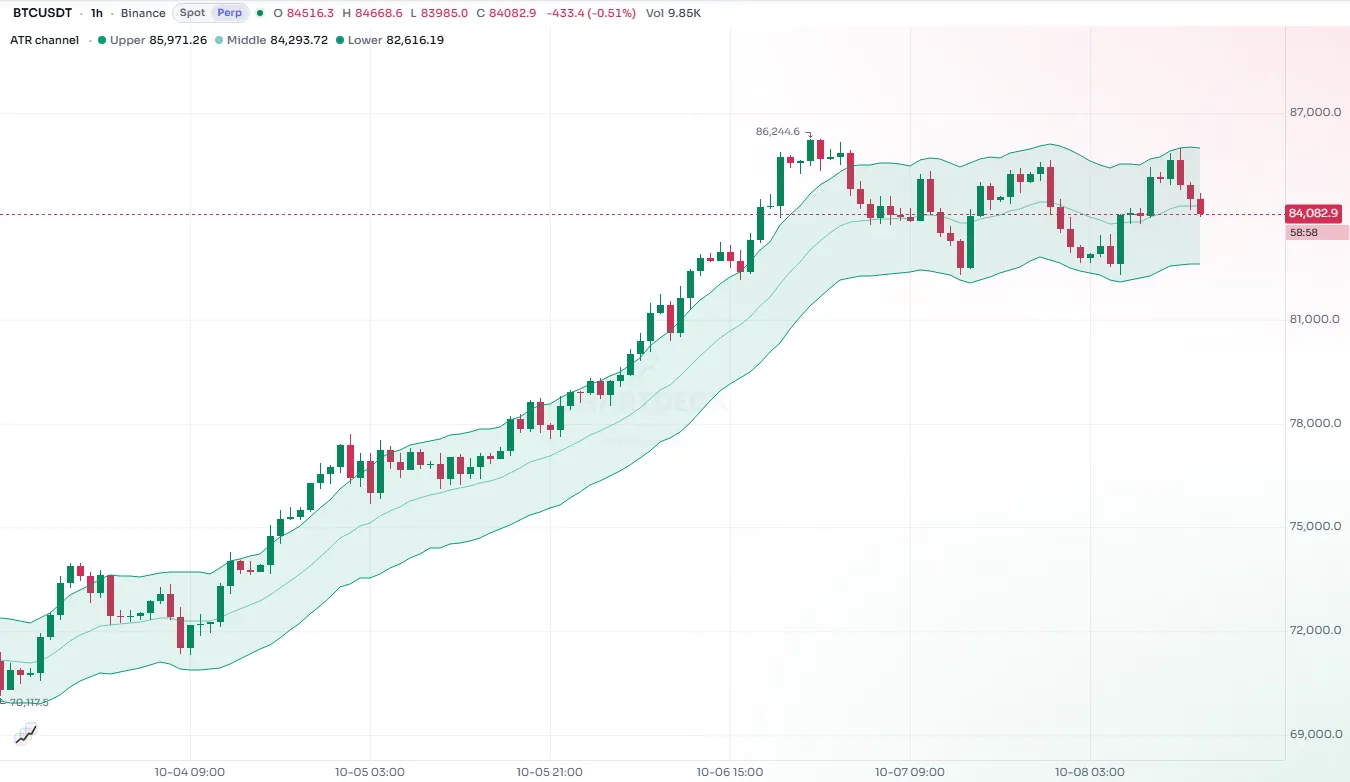
Notice the color: color.new(color.accent, 90) is the accent color at 90% transparency. A fill covers a lot of the chart, so it should be faint enough for the candles to stay readable. Between 80 and 95 is a good range for a fill over the price.
| Argument | What it does |
|---|---|
plot1, plot2 | The two plot handles (or hline1, hline2: two hline handles) |
color | The fill color: constant, or different on each bar |
title | The name in the Style tab, where the user can change the fill's color and opacity |
display | display.all or display.none (an input works, to switch the fill on and off) |
show_last | Fill only the last N bars (plot fills) |
look, variant | A named style made with style.fill |
editable and fillgaps are accepted for compatibility and change nothing.
#A color that changes per bar
The color can be any expression, so a fill can switch with the market. This is the classic trend cloud: green while the fast average is above the slow one, red while it is below.
//@chartscript 1
indicator("Trend cloud", { overlay: true })
const fastLine = ta.ema(close, 12)
const slowLine = ta.ema(close, 26)
const up = fastLine > slowLine

const pf = plot(fastLine, "Fast", up ? color.up : color.down)
const ps = plot(slowLine, "Slow", color.muted)
fill(pf, ps, up ? color.new(color.up, 80) : color.new(color.down, 80), "Cloud")
A color of na on a bar leaves that bar unfilled. That gives you conditional fills: shade a channel only while the price is outside it, or only during a session.
const mid = ta.sma(close, 20)
const dev = ta.stdev(close, 20) * 2
const pu = plot(mid + dev, "Upper", color.muted)
const pl = plot(mid - dev, "Lower", color.muted)
// shade the bands only while the close is outside them
fill(pu, pl, close > mid + dev || close < mid - dev ? color.new(color.orange, 80) : na, "Breakout")#Filling between levels
Give fill two hline handles to shade a fixed zone, such as the band between 30 and 70 on an oscillator. More on levels in Levels.
//@chartscript 1
indicator("RSI zone", { overlay: false })
plot(ta.rsi(close, 14), "RSI", color.accent, 2)
const top = hline(70, "Overbought", color.muted, hline.style_dashed)
const bottom = hline(30, "Oversold", color.muted, hline.style_dashed)
fill(top, bottom, color.new(color.accent, 92), "Neutral zone")
A fill joins two plots or two hlines, never one of each. To shade between a plot and a fixed level, plot the level as a constant series and hide it with display: display.none:
//@chartscript 1
indicator("Momentum above zero", { overlay: false })
const mom = ta.mom(close, 10)
const pm = plot(mom, "Momentum", color.accent, 2)
const zero = plot(0, "Zero", { display: display.none })
fill(pm, zero, mom > 0 ? color.new(color.up, 70) : color.new(color.down, 70), "Area")#Gradient fills
The gradient form of fill shades each bar vertically from one color to another. You give the value where the top color applies and the value where the bottom color applies:
fill(plot1, plot2, top_value, bottom_value, top_color, bottom_color)
Between the two values the color blends smoothly. A gradient is a good way to show how far something has gone, not just which side it is on: a fill that is strong at the extreme and fades towards the middle.
//@chartscript 1
indicator("RSI with gradient zones", { overlay: false })
const rsi = ta.rsi(close, 14)
const pr = plot(rsi, "RSI", color.accent, 2)
const p70 = plot(70, "Upper", color.muted, { display: display.none })
const p30 = plot(30, "Lower", color.muted, { display: display.none })
const p50 = plot(50, "Middle", color.muted, { display: display.none })

// above 70: strong red at 90 fading to nothing at 70; below 30: the mirror in green
fill(pr, p70, 90, 70, color.new(color.down, 20), color.new(color.down, 100), "Overbought")
fill(pr, p30, 30, 10, color.new(color.up, 100), color.new(color.up, 20), "Oversold")
fill(p70, p30, color.new(color.accent, 95), "Range")
hline(50, "Middle line", color.muted, hline.style_dotted)
The top and bottom values and both colors may be series, so the gradient itself can move with the data. For a gradient across bars (each bar a single color picked from a range), color an ordinary fill with color.from_gradient; see Colors.
#Transparency in fills
A fill is only useful if it stays out of the way. Some guidelines:
- Over the price: 85 to 95 transparency, so candles show through.
- In an oscillator pane: 70 to 90 is fine, as there is less underneath.
- Use
color.new(c, t)to set transparency on any color, including theme colors. See Colors. - The user can also change a fill's opacity in the Style tab, whatever your script says.
#Order and offsets
Fills are drawn behind the plots they join, so lines stay crisp on top. When a plot has an offset, the fill follows the shifted plot, and each filled bar takes the color of the bar its values came from.