

The import report
How to read the report the Pine importer shows: verdicts, numbers, the five groups of items, line links and the copied text.
Every file you convert gets a report card. It answers three questions: does the converted script run, did anything change meaning, and what is missing? Read it before you save, and keep it at hand while you check the script on a chart.
The converted script is printed in ChartScript's syntax (braces, const / let, state, &&, options objects). Those changes of form are not listed item by item: they never change a value. The report lists what can matter: changed meaning, missing output, substituted data and renamed built-ins.
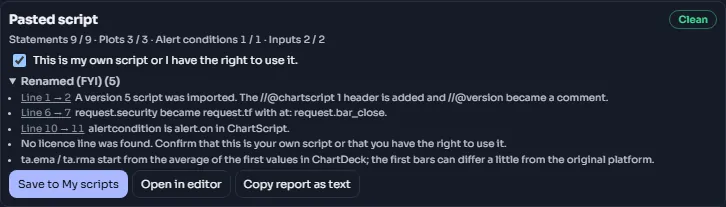
#What is on the card
From top to bottom:
- The file name (or Pasted script) and the verdict chip.
- The numbers: how many of the original's statements, plots, drawings, alert conditions and inputs are still there, written as kept / total (for example Plots 12 / 12). A kind the script does not use is left out.
- The license found in the header (License: MPL-2.0), or a plain warning for a non-commercial license.
- The rights box, only when no license line was found: This is my own script or I have the right to use it. Save stays off until you tick it.
- The items, in five groups that fold open and closed. Each group shows how many items it has. Blocking is open by default; open the others yourself.
- The actions: Save to My scripts, Open in editor and Copy report as text. The first two appear only when the import produced a script.
#Verdicts
The verdict is worked out from the groups that have items:
| Verdict | When | What it means for you |
|---|---|---|
| Clean | only Renamed (FYI) items | The script runs and means the same. Save it and check it on a chart |
| Runs with changes | at least one Meaning changed item, nothing worse | It runs, but some values can differ from the original. Read every Meaning changed item |
| Partial | at least one Not drawn yet or Data substituted item | It runs, but part of its output is missing or gives na |
| Not supported | at least one Blocking item | It does not run as it is. Fix the blocking items, or add the missing files and convert again |
#The five groups
The group names below are the exact labels on the card, in the order the card shows them.
#Blocking
Something stops the script from compiling or being imported at all.
| Typical item | What to do |
|---|---|
| This script's source is not open; it can't be imported. | The source is protected, invite-only or obfuscated. Only readable source can be imported |
| Scripts written for versions 1 to 3 are not supported: convert the script to version 5 or later in its original editor first. | Do what it says, then import again |
| The library … was not added: add its file with this script (several files can be imported at once). | Add the library's file to the dialog with the script and press Convert again |
| The library … is a public library by … on the original platform. | ChartDeck does not download libraries. Copy the library's source from its page (check its license) and import it together with your script |
a compiler error, such as CS2008: … | Open the line in the editor and fix it. The error's own page explains it: see the error index |
#Meaning changed
The script runs, but on some bars it can give a different value from the original. These are the items to read carefully.
| Typical item | What to do |
|---|---|
| This is a strategy. Strategies are not supported yet: it is imported as an indicator. | Nothing to fix; the order lines are comments. Strategies are not available yet |
| The strategy settings were dropped: … / … lines use orders or strategy results and are kept as comments | Check that nothing you want to see depended on them |
| The original looked into the future on past bars (lookahead on) … | The original's history showed values that were not known at the time. ChartScript shows the last closed value, so past signals move. This is usually the honest result; keep it |
| lookahead off: ChartScript shows the higher bar as it develops … | History matches live in ChartScript. If you want only closed higher bars, change { at: request.developing } to { at: request.close } |
| … divides two whole numbers: ChartScript keeps the fraction … | If the original relied on a whole number, write int(…) around the division |
| A bool cannot be na in ChartScript (as in version 6): na became false here. | Usually fine. Check any logic that tested the na |
| x == na is always false; it became na(x). | Nothing to do: the fix is applied |
| Timeframe "D" is "1D" here (as in version 6). | Nothing to do: the comparison was rewritten |
a compiler warning, such as CS2503: … | Read it; the warning's page explains when it matters |
#Not drawn yet
Part of the script uses something ChartScript does not have yet. Those lines are kept as comments marked // [import], so the rest runs.
| Typical item | What to do |
|---|---|
| indicator(timeframe = ...) is not used yet: the script runs on the chart timeframe. | Put the script on a chart of the timeframe you want, or move the calculation into a request.tf |
| … is not available in ChartScript yet; this line is kept as a comment. | Leave it, or rewrite that part another way |
| This line uses …, which was commented out …; it is kept as a comment too. | It depends on a line above that was commented out |
#Data substituted
The script asks for data ChartDeck does not have, or has under another name. The value is replaced, usually by na.
| Typical item | What to do |
|---|---|
| request.financial has no ChartScript equivalent; it gives na here. (also economic, earnings, dividends, splits …) | Remove or replace that part: this data is not available |
| syminfo.… has no ChartDeck equivalent; it gives na here. | Use another market.* value or a constant |
| The market "BINANCE:ETHUSDT" is matched to a ChartDeck market …; unknown markets give na. | Check that the market exists in ChartDeck's market search. Change the text if it does not |
| The market is built at run time … | The market name is put together while the script runs; check that the result is a ChartDeck market |
| bid (bid / ask) arrives with order-book data in a later version; it gives na here. | Not available yet |
CS3103 (a seconds size that does not exist) | The seconds timeframes are 1S, 5S, 10S, 15S, 30S and 45S: a request for another size gives na. Use one of the six |
#Renamed (FYI)
The importer changed a name or a form, and the meaning is the same. You do not need to act on these; they are there so you can find your way around the converted text. Examples: alertcondition is alert.on in ChartScript., varip is live state in ChartScript (same meaning)., input(...) became input.int (typed input)., request.security became request.tf with at: request.close., Your name market is used by ChartScript; it became market_., the license line, and warnings that the original script had too.
#Line links
An item tied to a line starts with Line 14 → 17. The first number is the line in your original file; the second is the line in the converted script. The two drift apart as you go down the file, because the header adds a line and every block gains a closing } line, so always use the second number in the editor. Click it to open the converted script in the editor with the cursor on that line. The dialog closes, and the editor holds the converted script as a new, unsaved script.
Items about the whole file (the license, a missing library) have no line.
When the same compiler warning appears in many places, the report shows it once: The same warning appears 16 times (lines 40, 52, …). The link goes to the first place.
#What commented-out lines look like
Here is a strategy after import. Its strategy() became indicator(), the order line is a comment, and the emptied if block got an na so it still has a statement:
//@chartscript 1
// (imported) @version=5
indicator("Range breakout", { overlay: true })
const lookback = input.int(20, "Lookback")
const hi = ta.highest(high, lookback)[1]
const lo = ta.lowest(low, lookback)[1]
plot(hi, "High", color.green)
plot(lo, "Low", #FF5252)
const breakUp = ta.crossover(close, hi)
if (breakUp) {
    na  // [import] strategy.entry("L", strategy.long)
}
alert.on(breakUp, "Break up", "Range broken upward")
The #FF5252 is the importer keeping the version 5 shade of color.red, so the line looks as it did before.
#Copy report as text
Copy report as text puts the report on your clipboard as plain text: the verdict, the numbers, then each group under its short key ([blocking], [meaning], [notYet], [data], [fyi]) with the original line numbers. It is handy for keeping notes or asking for help:
Runs with changes
statements: 16 / 16
plots: 3 / 3
alerts: 1 / 1
inputs: 1 / 1

[meaning]
Line 2: This is a strategy. Strategies are not supported yet: it is imported as an indicator. ...
Line 6: The original looked into the future on past bars (lookahead on); ...

[fyi]
Line 3: input(...) became input.int (typed input).
Line 15: alertcondition is alert.on in ChartScript.#When saving fails
Save to My scripts saves the libraries first, then the script. If the server refuses, the message says why, for example The converted script has 2.3 MB of code; a script can hold up to 2 MB. Comments and blank lines do not count., or The server could not compile it, line 40: … with an Open in editor button that goes to that line.