

Other timeframes and markets
request.tf, request.market, request.lower_tf and request.market_lower_tf in detail - the at modes, repainting, data contexts, plan caps and market ids.
A script runs on the chart's bars, but it can also read values from another timeframe of the same market (the daily high on an hourly chart) or from another market (ETH while you look at BTC). These are requests. This page is precise on purpose: the way a request lines its values up with your chart decides whether your indicator tells the truth about the past.
In Bar replay, requests follow the replay clock: a requested context holds only the bars known at the replay's time, so a script that makes requests keeps running. See Scripts in Bar replay.
#The request functions
const dailyClose = request.tf("1D", close)  // this market, another timeframe
const ethHourly = request.market("BINANCE:ETHUSDT", "60", close)  // another market (and a timeframe)
const minuteVols = request.lower_tf("1", volume)  // every 1-minute bar inside this chart bar
const binanceMinutes = request.market_lower_tf("BINANCE:BTCUSDT", "1", close)  // another market's 1-minute bars inside it
const ethLive = request.live("BINANCE:ETHUSDT", "60")  // does that context update live?
plot(dailyClose)| Function | Returns |
|---|---|
request.tf(timeframe, expression, at, gaps) | expression computed on the chart's market at timeframe |
request.market(market, timeframe, expression, at, gaps) | expression computed on another market |
request.lower_tf(timeframe, expression) | an array: expression on each lower-timeframe bar inside the chart bar, oldest first |
request.market_lower_tf(market, timeframe, expression) | the same array for another market's lower-timeframe bars |
request.live(market, timeframe) | true when that context updates live (see plan limits) |
at defaults to request.close and gaps to false. An empty timeframe "" means the chart's own timeframe, so request.market("BYBIT:SOLUSDT", "", close) reads SOL on whatever timeframe the chart shows.
Both the market and the timeframe may change at run time: they can come from inputs, from a switch, or from a loop over a list. Requests may also sit inside if blocks, loops and library functions.
#The expression runs on the requested bars
The second argument is not a value you hand over; it is code that ChartDeck runs again on the requested bars. Inside it:
open,high,low,close,volume,timeandbar_indexare those of the requested bars.ta.*functions run on the requested bars with their own state.request.tf("1D", ta.sma(close, 20))is a 20-day average, not a 20-hour one.- A tuple brings back several values from one request:
const [o, h] = request.tf("1D", [open, high[1]], { at: request.start }). - ChartDeck data series (
oi.close,funding.rate,flow.cvd,flow.agg_delta...) are those of the requested market at the requested timeframe:request.market("BINANCE:ETHUSDT", "", oi.close)is ETH's open interest. - A user function call works too, and is the clean way to request something complex.
A top-level const (or a let that is never assigned again) that the expression reads is recomputed on the requested bars as well, so this works as you would hope:
const spread = high - low
const dailySpread = request.tf("1D", ta.sma(spread, 10))
plot(dailySpread)
Some things cannot cross into the requested bars:
- A
statevariable, or aletthat is assigned again later, lives on the chart's bars; inside the request it isna(forstate) or the chart's current value. Warning CS3122. Move the logic into a function that you call inside the request. - A parameter or local variable of the code around the request reads
nainside it. Warning CS3123. This is common in helpers likeconst f = (src) => request.tf("1D", src): pass the timeframe or market as the parameter instead, and compute the value inside. - Plots, drawings, inputs and alerts are refused inside a request expression (CS3120), and so is a request inside another request (CS3121).
- Record data (trade prints, liquidation levels, the order book, volume at price, the economic calendar) belongs to the chart's market: inside a request it reads
naor empty (warning CS3124).
#The three at modes
A higher-timeframe bar spans many chart bars. Take a 1-hour chart reading the daily close. On the 15:00 bar of Wednesday, which daily value should it show? Tuesday's close is final. Wednesday's "close" so far is just the latest price. The at argument is how you choose, and the choice decides whether the indicator repaints.
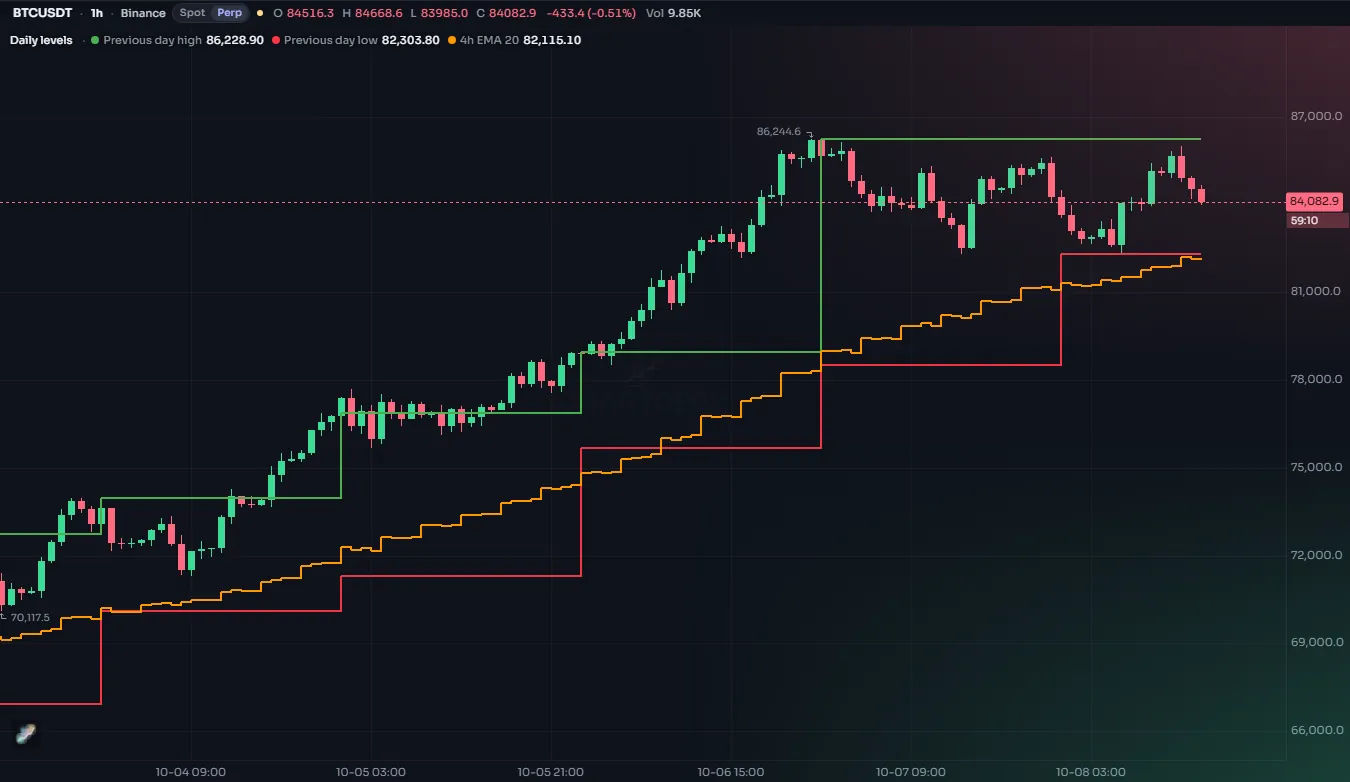
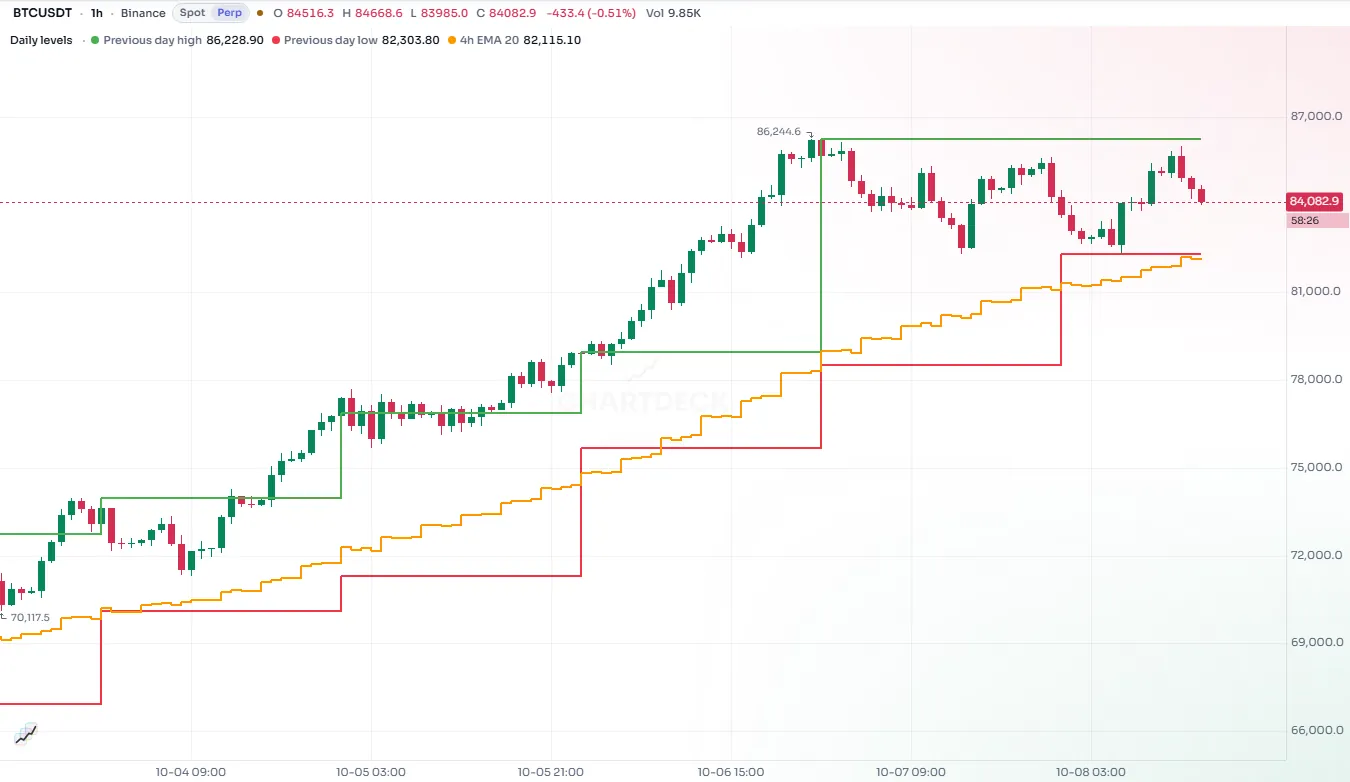
| Mode | What each chart bar sees | Moves during a chart bar? | History matches what you saw live? |
|---|---|---|---|
request.close (default) | the value of the last requested bar that had closed by the time the chart bar opened | no | yes |
request.start | the value at the start of the current requested bar (only for values already known then) | no | yes |
request.developing | the requested bar so far, up to the chart bar's close | yes, on the live bar | yes, for closed chart bars |
#request.close: final values, one bar late
const prevDayClose = request.tf("1D", close)
plot(prevDayClose, "Yesterday's close", color.muted, { style: plot.style_stepline })
Every hourly bar of Wednesday shows Tuesday's close, from 00:00 to 23:00. The value changes on the first bar of Thursday, to Wednesday's close. It never changes while a chart bar is forming, and a bar you look at tomorrow shows exactly what it showed live. This is why it is the default.
The price is lag: the value is always one requested bar old. For most uses (yesterday's levels, a higher-timeframe trend that must not flicker) that is exactly right. Because the values were final when the chart bar opened, nothing from the future leaks into the past.
#request.start: what was known at the open
const [dOpen, pdHigh, pdLow] = request.tf("1D", [open, high[1], low[1]], { at: request.start })
plot(dOpen, "Today's open", color.accent, { style: plot.style_stepline })
plot(pdHigh, "Yesterday's high", color.up, { style: plot.style_stepline })
plot(pdLow, "Yesterday's low", color.down, { style: plot.style_stepline })
Some values are final the moment the higher bar opens: today's open, yesterday's high, an average of the opens. With request.start each chart bar gets them for the current requested bar, with no lag: every hourly bar of Wednesday shows Wednesday's open and Tuesday's high.
To keep this honest, the compiler accepts request.start only when it can prove that every part of the expression is known when the requested bar opens. Otherwise compiling fails with CS3110, naming the part that is not known:
//@chartscript 1
indicator("Not known at the open")
const todayHigh = request.tf("1D", high, { at: request.start })
plot(todayHigh)
The rule, part by part:
| Part of the expression | Known at the start? |
|---|---|
| literals, constants, inputs | yes |
open, time, bar_index, timeframe.*, market.* | yes |
any series with a constant offset of 1 or more: high[1], close[2], ta.rsi(close, 14)[1] | yes |
a non-constant offset, x[n] | only when the compiler can see n ≥ 1, e.g. x[math.max(1, n)] |
high, low, close, volume, time_close at offset 0 | no |
a ta.* function whose inputs are all known at the start, such as ta.sma(open, 20) | yes |
any other ta.*, user function or state value at offset 0 | no, unless every input is known and it keeps no state (math.*, arithmetic, str.*) |
barstate.*, timenow | no |
#request.developing: the bar so far
const todayHigh = request.tf("1D", high, { at: request.developing })
plot(todayHigh, "High of the day so far", color.up, { style: plot.style_stepline })
This shows the requested bar as it builds. Each hourly bar of Wednesday shows Wednesday's high up to the close of that hourly bar: the 10:00 bar shows the high from midnight to 11:00. On closed chart bars that value never changes again, so the history is exactly what you would have seen live at each bar's close. Only the live chart bar moves, together with the requested bar.
How the "so far" value is made depends on the request:
- A higher timeframe of the chart's own market: built from the chart's own bars, so it is exact as of each chart bar.
- A higher timeframe of another market: the chart has no bars of that market to build from, so it behaves as
request.close, and the run notes this once in the log. - A lower or equal timeframe (any market): the last requested bar that opened before the chart bar closes, that is, the last intrabar. On the live chart bar that intrabar may itself be live.
#Repainting, mode by mode
| Mode | On closed chart bars | On the live chart bar | Safe for signals? |
|---|---|---|---|
request.close | final, never changes | does not move | yes; one requested bar of lag |
request.start | final, never changes | does not move | yes; only for values known at the open |
request.developing | final once the chart bar closed | moves with the requested bar | act on closed bars (barstate.isconfirmed) |
None of the modes ever shows a chart bar something that happened after it closed. The general topic, including the live bar and other sources of repainting, is on repainting.
#Gaps
With gaps: false (the default) the requested value is carried forward onto every chart bar, which gives the familiar stepped line. With gaps: true the value appears only on the chart bar where it changes and is na on the others. Use it when you want one mark per requested bar, for example a dot each time a new daily value arrives:
const newDaily = request.tf("1D", close, { gaps: true })
plot(newDaily, "Daily close", color.accent, { style: plot.style_circles, linewidth: 3 })#How far back a request reaches
A requested context loads the span your script runs on (5,000 chart bars unless the script says otherwise), counted in its own bars, plus the warm-up its expression needs. For a moving average or an RSI that is plenty. An expression whose value depends on how far back it started is different: zones, pivots carried forward, counters and running sums. Give it a fixed depth with calc_bars_count, the number of bars of the requested timeframe to load:
const upBars5m = request.tf("5", ta.cum(close > open ? 1 : 0), { calc_bars_count: 10000 })
plot(upBars5m, "Up 5m bars")- The value must be a constant number, up to 20,000. A variable or an input is an error (
CS2103). - It is a minimum: a context that needs more for the span the script runs on still loads it.
- Requests of the same market and timeframe share one context, so they share its depth: the largest
calc_bars_countamong them. A request of that pair withoutcalc_bars_countreads the deeper history too. - On the chart's own market and timeframe, a depth larger than the bars your script runs on gives that request its own, deeper history (each such depth is a context of its own). Your script itself still runs on its usual bars. A depth within the run reads the run's own bars.
- On
request.lower_tfandrequest.market_lower_tfit is how far back the lower-timeframe bars reach. Alerts and protected scripts read lower-timeframe values that far back too. - Your script, its alerts and a protected script running on ChartDeck's servers all load the same bars for a request, so they show the same values.
#Lower timeframes
A lower timeframe has several bars inside each chart bar, so "the value" needs a choice:
request.tf("1", close)with the defaultrequest.closegives the previous chart bar's last 1-minute value.request.tf("1", close, { at: request.developing })gives this chart bar's last 1-minute value so far.request.lower_tf("1", expr)gives them all, as an array, oldest first. This is usually what you want.
The finest timeframe you can request is "1S" (one second): see Seconds timeframes below.
Lower-timeframe data is heavy, so ChartDeck loads it for the visible part of the chart plus 50 bars. Older chart bars get an empty array (never a partial one) until you scroll back to them, which loads them and runs the script again (only within the script's run: bars before it never get script values). A script on ChartDeck's servers (a protected script, a script alert) has no view: it reads the lower-timeframe bars of the newest 200 chart bars, as a chart at its right edge does, or as far back as calc_bars_count reaches. Code that reads intrabars should handle the empty case:
//@chartscript 1
indicator("Intrabar up and down volume")
const tf = input.timeframe("1", "Intrabar timeframe", { options: ["1", "5", "15"] })

const closes = request.lower_tf(tf, close)
const opens = request.lower_tf(tf, open)
const vols = request.lower_tf(tf, volume)

let upVol: float = 0.0
let downVol: float = 0.0
for (const [i, v] of vols) {
    if (array.get(closes, i) >= array.get(opens, i)) {
        upVol += v
    } else {
        downVol += v
    }
}

const hasData = array.size(vols) > 0
plot(hasData ? upVol : na, "Up volume", color.up, { style: plot.style_columns })
plot(hasData ? -downVol : na, "Down volume", color.down, { style: plot.style_columns })
hline(0, "Zero", color.muted)#Lower timeframes of another market
request.market_lower_tf(market, timeframe, expression) gives the same arrays for another market: the lower-timeframe bars of that market that fall inside each chart bar. A MEXC chart can look at Binance's 1-minute candles, for example to see where the bigger market's volume came inside each bar. The same window rule applies (the visible bars plus 50, older bars get an empty array until you scroll to them), and the context counts toward your plan's markets and timeframes like any request.
//@chartscript 1
indicator("Binance minutes inside each bar")
const other = input.market("BINANCE:BTCUSDT", "Reference market")

const vols = request.market_lower_tf(other, "1", volume)
const closes = request.market_lower_tf(other, "1", close)
const hasData = array.size(vols) > 0
// the minute with the most volume on the reference market, and where it closed against this bar's range
const busiest = hasData ? array.indexof(vols, array.max(vols)) : -1
plot(hasData ? array.max(vols) : na, "Busiest reference minute (volume)", color.accent, { style: plot.style_columns })
plot(busiest >= 0 ? (array.get(closes, busiest) - low) / math.max(high - low, market.tick) : na, "Where it closed (0 low, 1 high)", color.muted, { display: display.data_window })
An empty market ("") is the chart's own market, the same as request.lower_tf.
#Seconds timeframes
A request can name a seconds timeframe: "1S", "5S", "10S", "15S", "30S" or "45S", on the chart's market or on another one, from a chart of any timeframe.
//@chartscript 1
indicator("Ten-second close")
const fast = request.tf("10S", close, { at: request.developing })
plot(fast, "10S close")
Seconds bars are built from the live trades, so a few things differ from minute bars:
- History is short. ChartDeck keeps the last 6 hours of seconds bars of a market it records, and recording starts when somebody first watches that market in seconds. Before that the request gives
na, and the legend row says once where it starts ("Seconds history starts at 14:05 UTC"). A few exchanges publish seconds candles of their own and go back further. A script loads at most 3,000 bars per seconds request, and a seconds request warms up on at most 300 bars. - Your plan decides which sizes. They are the seconds timeframes your plan can chart. A size that is not in your plan gives
naand the legend row says so; the script still compiles and its other values still draw. - At most 4 seconds requests per script, counted by market and timeframe, and they count toward the script's request limit like any other. All your scripts together can read seconds bars of 8 markets at once.
- Some markets have none. A market without a trade stream (daily reference series, for example) gives
na, and so does any seconds request while seconds data is at capacity. The legend row says which. - Protected scripts and script alerts run on ChartDeck's servers and are served seconds bars too. The sizes are the ones the reader's plan charts (the member looking at a protected script, the owner of an alert), and the servers keep seconds data for a limited number of markets at once: past that a seconds request gives
naand the legend row says so. - Other sizes do not exist.
"7S"or"20S"compiles with warning CS3103 and givesna.
A script whose seconds request gives na should fall back to a minute timeframe with nz or a plain na test, so it still draws for every reader.
#Other markets
A market is written VENUE:SYMBOL, for example "BINANCE:ETHUSDT", "BYBIT:SOLUSDT" or "OKX:BTCUSDT". The venue part is ChartDeck's venue id and its case does not matter. A venue id names one kind of market: BINANCE is Binance's perpetual futures, while BINANCE_SPOT is Binance spot, and COINBASE is spot. A trailing .P (a perpetual suffix used elsewhere) is accepted and dropped.
The safest ways to get a valid id:
market.idis the chart's own market in this form, andmarket.venueits venue, so you can build a sibling:market.venue + ":ETHUSDT".input.marketlets the user type the market in the settings.ticker.new("BINANCE", "ETHUSDT")joins the two parts.
A constant id that does not even have the VENUE:SYMBOL shape gives warning CS3104. A well-formed id that ChartDeck does not list gives na for the whole series, and the legend shows a one-time note. While a context's bars are still loading, its requests give na too, so start-up na values are normal.
Inside request.market, the bars are the other market's, aligned to your chart by time with the same three at rules.
const eth = request.market("BINANCE:ETHUSDT", "", close, { at: request.developing })
const ratio = close / eth
plot(ratio, "Chart market / ETH")#How many you can use
Each distinct pair of market and timeframe a script asks for is one data context. Identical requests share their context, so asking for the daily close and the daily high costs one context, not two.
| Plan | Extra timeframes and markets per script | Other markets that update live |
|---|---|---|
| Beginner | 20 | 5 |
| Plus | 40 | 10 |
| Pro | 80 | 20 |
| Elite | 128 | 100 |
- When a script's constant requests already exceed the plan's number, compiling fails with CS3004. Requests whose market or timeframe is only known at run time are counted while the script runs: past the limit they give
naand the log says so once. - Live updates for other markets. A request of 1 hour or more on a market no chart of the page streams needs no live stream: it is refreshed about every 30 seconds (and on its bar close), costs nothing, and
request.livereturnstruefor it. Shorter requests of other markets stream live: each other market counts once toward your plan's live markets and live streams, in the order the script first asks for them; the chart's own market, and a market another pane already streams, cost nothing. A chart's own price feed always comes first: when every live stream of your plan is in use, a script's request gives its stream back to the chart. A request that gets no live stream keeps its full history and refreshes every minute (and on its bar close) instead of on every tick.request.live(market, timeframe)returnsfalsefor it, and the legend says "Some data refreshes every minute on your plan".
Requests for higher timeframes of the chart's own market are cheap: ChartDeck builds them from the bars your script runs on wherever that gives exactly the venue's own candles.
#A whole example: higher-timeframe trend with a market comparison
This indicator plots the daily 20-period EMA on any intraday chart without repainting, marks hourly closes above or below it only once the hourly bar has closed, and colors the background when a second market (ETH by default) agrees.
//@chartscript 1
indicator("HTF trend filter", { overlay: true })

const htf = input.timeframe("1D", "Trend timeframe", { options: ["240", "1D", "1W"] })
const len = input.int(20, "EMA length", { minval: 2, maxval: 200 })
const other = input.market("BINANCE:ETHUSDT", "Confirm with market")

// default at = request.close: the last closed higher bar, so history = live
const htfEma = request.tf(htf, ta.ema(close, len))
// the same test on another market, also on closed bars only
const otherUp = request.market(other, htf, close > ta.ema(close, len))

plot(htfEma, "HTF EMA", color.accent, 2, plot.style_stepline)

const above = close > htfEma
const crossUp = above && !above[1] && barstate.isconfirmed
const crossDown = !above && above[1] && barstate.isconfirmed
plotshape(crossUp, "Closed above", shape.triangleup, location.belowbar, color.up)
plotshape(crossDown, "Closed below", shape.triangledown, location.abovebar, color.down)

const agree = above == otherUp
bgcolor(agree ? (above ? color.new(color.up, 92) : color.new(color.down, 92)) : na, { title: "Markets agree" })

if (barstate.islast && !request.live(other, htf)) {
    log.warning("The comparison market refreshes every minute (plan's live stream limit).")
}
otherUp is a bool request, so on bars where the other market has no data yet it is false, not na; for a stricter test, request the EMA as a number and check it with na().