

Text and shapes
Mark signal bars with plotshape and plotchar: shapes, characters, locations, sizes, text under or over the mark, and arrows sized by value.
A line shows a value. A mark shows an event: a cross, a breakout, a divergence, a new high. ChartScript has three outputs for marking bars:
plotshapedraws a shape (triangle, circle, flag, label bubble ...).plotchardraws a single character, which can be any Unicode symbol.plotarrowdraws up and down arrows whose length follows a value.
All three are outputs, like plot: they are declared at the top level, each counts towards the 128-output cap, and each appears in the Style tab. For marks placed freely anywhere on the chart, with changing text, use labels instead.
#Marking signal bars
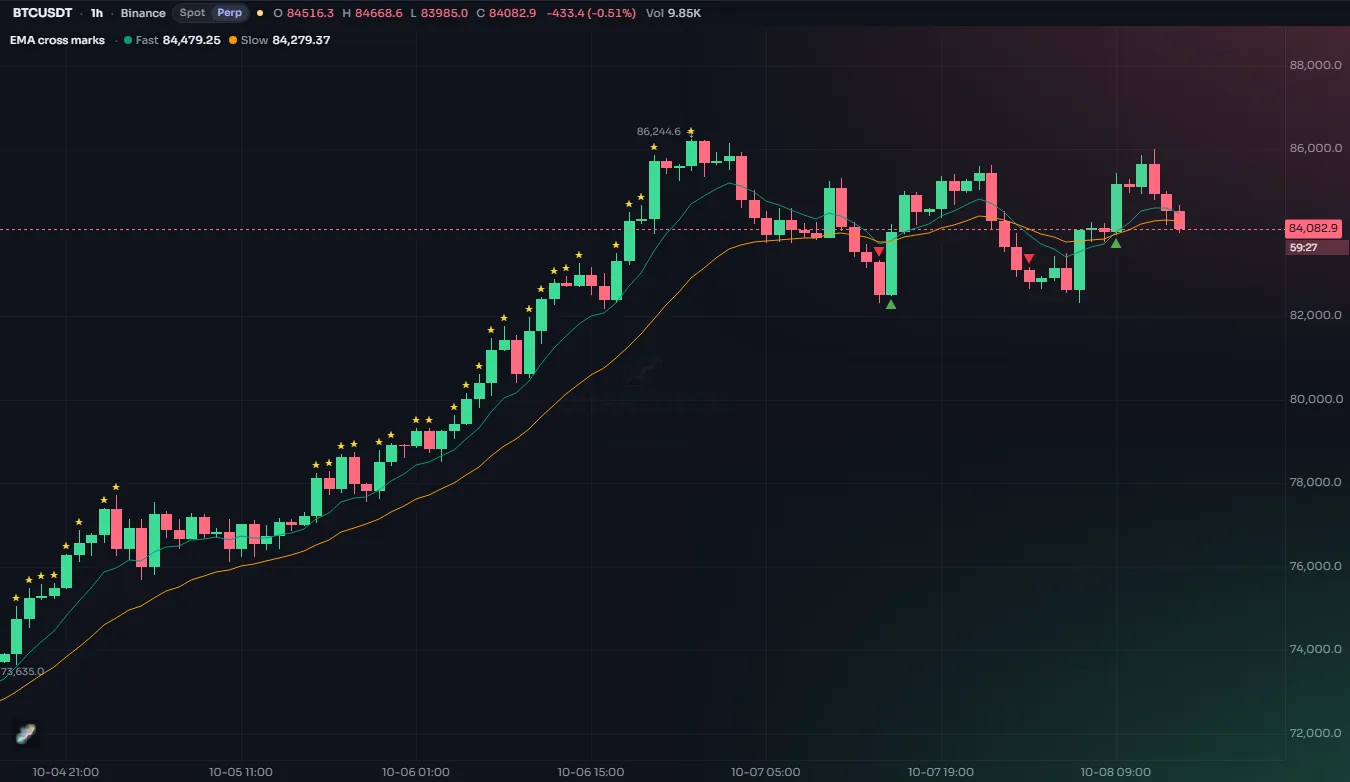
plotshape takes a condition. On bars where it is true the shape is drawn; elsewhere nothing is.
//@chartscript 1
indicator("EMA cross marks", { overlay: true })
const fastLine = ta.ema(close, 9)
const slowLine = ta.ema(close, 21)
plot(fastLine, "Fast", color.accent)
plot(slowLine, "Slow", color.muted)

const crossUp = ta.crossover(fastLine, slowLine)
const crossDown = ta.crossunder(fastLine, slowLine)
plotshape(crossUp, "Cross up", shape.triangleup, location.belowbar, color.up, { size: size.small, text: "Buy" })
plotshape(
    crossDown,
    "Cross down",
    shape.triangledown,
    location.abovebar,
    color.down,
    { size: size.small, text: "Sell" }
)
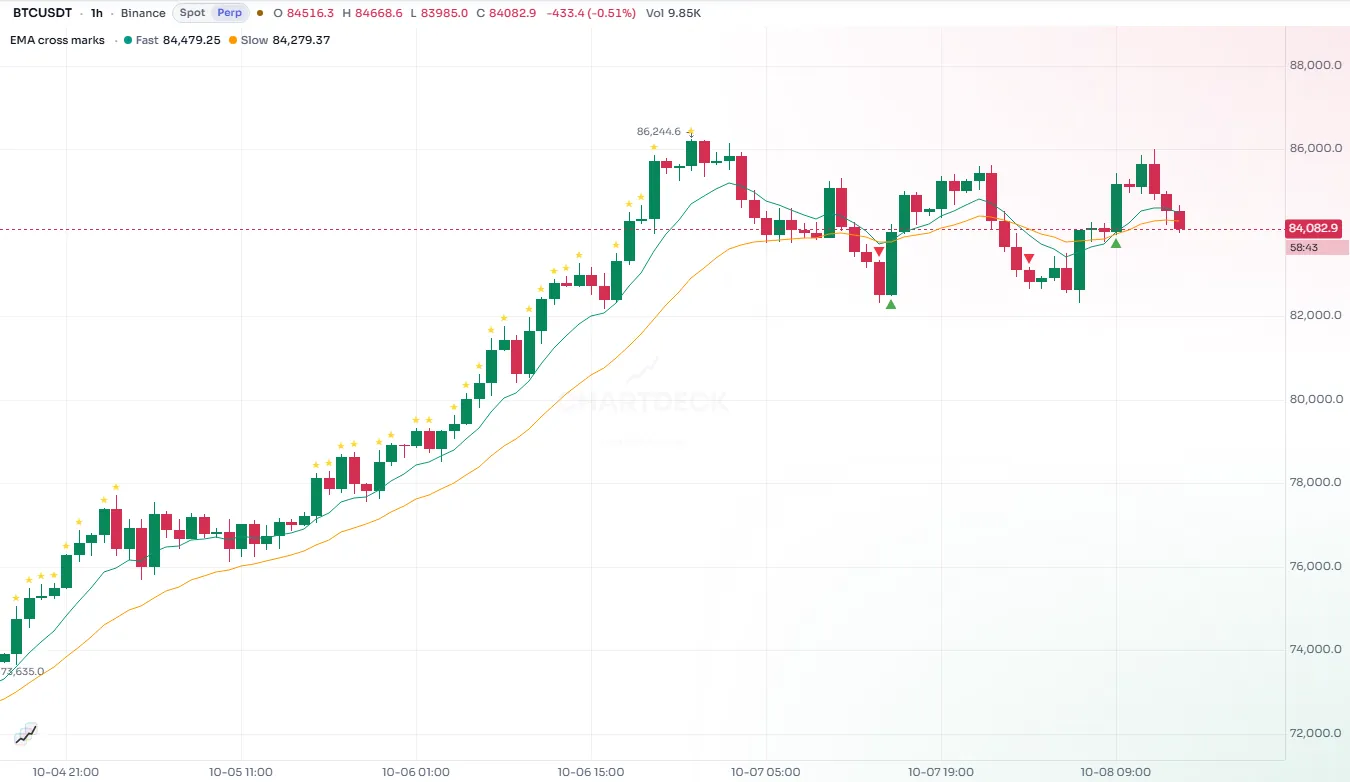
The series can also be a number: the mark is drawn on every bar where the value is not na (and not zero). That matters for location.absolute, below.
#Shapes
| Constant | Shape |
|---|---|
shape.triangleup, shape.triangledown | Triangles pointing up or down |
shape.arrowup, shape.arrowdown | Arrows |
shape.labelup, shape.labeldown | A label bubble with a pointer; text goes inside it |
shape.circle | A filled circle |
shape.square | A filled square |
shape.diamond | A diamond |
shape.flag | A small flag |
shape.cross | A plus sign |
shape.xcross | An X (the default) |
#Where the mark sits
location decides the vertical position:
| Constant | Places the mark |
|---|---|
location.abovebar | Just above the bar's high (the default) |
location.belowbar | Just below the bar's low |
location.top | At the top edge of the pane |
location.bottom | At the bottom edge of the pane |
location.absolute | At the series value itself, as a price |
abovebar and belowbar follow the price candles, so they suit scripts that draw over the price. In an oscillator pane, top and bottom are usually better, or absolute to put the mark on the oscillator line:
//@chartscript 1
indicator("RSI extremes", { overlay: false })
const rsi = ta.rsi(close, 14)
plot(rsi, "RSI", color.accent, 2)
hline(70, "Upper", color.muted, hline.style_dashed)
hline(30, "Lower", color.muted, hline.style_dashed)

// a dot exactly on the RSI line where it turns back from an extreme
const turnDown = rsi[1] > 70 && rsi < rsi[1]
const turnUp = rsi[1] < 30 && rsi > rsi[1]
plotshape(turnDown ? rsi : na, "Turn down", shape.circle, location.absolute, color.down, { size: size.tiny })
plotshape(turnUp ? rsi : na, "Turn up", shape.circle, location.absolute, color.up, { size: size.tiny })
When several marks land on the same bar at the same location, they stack instead of covering each other: each new one above the last for abovebar, below the last for belowbar.
#Sizes
| Constant | |
|---|---|
size.tiny | Smallest |
size.small | |
size.normal | |
size.large | |
size.huge | Largest |
size.auto | Chosen by the chart (the default) |
The size may also come from an input, so users can make your marks bigger without the script running again. Members can also scale all of a script's text at once (Tiny, Small, Normal, Large, Extra-large) on the Labels & text tab of the settings dialog.
#Text on shapes
text writes a short text with the mark, on the side away from the candle: above a shape placed above the bar, below a shape placed below it, and inside the bubble for shape.labelup / shape.labeldown. \n starts a new line (up to 8 lines). textcolor sets its color; without it the text takes the mark's color, or a color that contrasts with the bubble for the two label shapes.
//@chartscript 1
indicator("Inside and outside bars", { overlay: true })
const inside = high < high[1] && low > low[1]
const outside = high > high[1] && low < low[1]
plotshape(
    inside,
    "Inside bar",
    shape.labeldown,
    location.abovebar,
    color.new(color.muted, 20),
    { text: "IB", textcolor: color.white, size: size.small }
)
plotshape(
    outside,
    "Outside bar",
    shape.labelup,
    location.belowbar,
    color.new(color.accent, 20),
    { text: "OB", textcolor: color.white, size: size.small }
)
The text is a constant string (or an input). It is plain text: it cannot change from bar to bar. When each mark needs its own text, such as the value of a pivot, use label.new instead (see Drawings).
text_formatting: text.format_bold, text.format_italic, or both added together, makes the text bold or italic:
plotshape(
    ta.crossover(close, ta.sma(close, 50)),
    "Breakout",
    shape.flag,
    location.belowbar,
    color.up,
    { text: "Break", text_formatting: text.format_bold }
)#Characters with plotchar
plotchar is like plotshape but draws one character of your choice instead of a shape. Any Unicode character works, which gives you a large set of symbols: ★, ●, ◆, ▲, ✓, ⚑, digits, letters.
//@chartscript 1
indicator("Volume spikes", { overlay: true })
const avgVol = ta.sma(volume, 20)
const spike = volume > avgVol * 2.5
plotchar(spike, "Spike", "◆", location.abovebar, color.orange, { size: size.tiny })
plotchar(spike && close < open, "Heavy selling", "▼", location.belowbar, color.down, { size: size.tiny })
Only the first character of char is used; the default is ★.
#Color per bar
As with plots, the color of a shape or character may change from bar to bar, and a bar whose color is na shows no mark. That lets one plotshape cover both directions:
const mom = ta.mom(close, 10)
const turned = math.sign(mom) != math.sign(mom[1])
plotshape(
    turned,
    "Momentum turn",
    shape.diamond,
    location.belowbar,
    mom > 0 ? color.up : color.down,
    { size: size.tiny }
)
textcolor may change per bar too. A textcolor that is na on a bar shows the mark without its text.
#Arrows sized by value
plotarrow takes a number instead of a condition. A positive value draws an up arrow below the bar, a negative value a down arrow above it, and 0 or na draws nothing. The length of each arrow follows the size of the value: the largest value on screen gets maxheight pixels (default 100), the smallest minheight (default 5).
//@chartscript 1
indicator("Volume pressure arrows", { overlay: true })
// signed volume on bars that move more than usual
const bigMove = math.abs(close - open) > ta.atr(14)
plotarrow(bigMove ? (close > open ? volume : -volume) : na, "Pressure", color.up, color.down, { maxheight: 60 })
colorup and colordown default to the theme colors color.up and color.down.
#Overlay or own pane
Marks are drawn in the pane of their script. In a script with overlay: true, abovebar / belowbar sit around the candles. In an own-pane script there are no candles to sit around, so abovebar and belowbar still refer to the bar's high and low, which may lie outside the pane's scale. Prefer top, bottom or absolute there.