

Migration overview
Bring your Pine Script indicators to ChartDeck: what the importer does, how ChartScript relates to Pine, and the steps of a migration.
#Who this section is for
This section is for you if you already have indicators written in Pine Script and want them on your ChartDeck charts. You might have written them yourself, or you might use open-source scripts whose license lets you adapt them.
You do not need to rewrite anything by hand to get started. ChartDeck has an importer that turns a Pine script into a ChartScript script and tells you, line by line, what it changed. These pages explain what it does, what it cannot do yet, and how to finish the job.
If you have never written ChartScript before, the first indicator tutorial is a short read and shows the editor you will be fixing things in.
#The importer in one paragraph
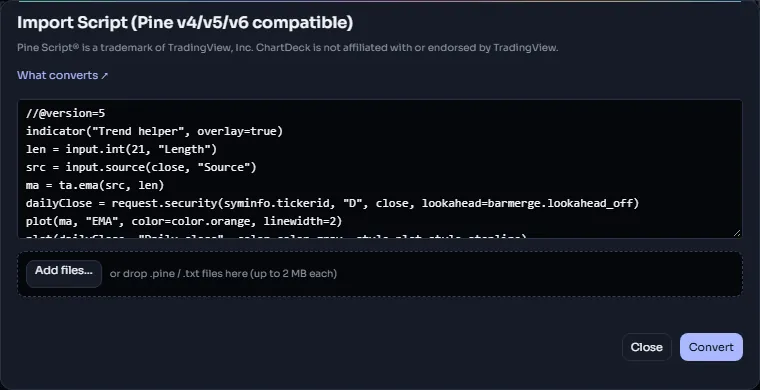
Open Indicators → My scripts and choose Import from Pine (the dialog is titled Import Script (Pine v4/v5/v6 compatible)). Paste a script, or add .pine / .txt files, several at once if a script needs its libraries, and press Convert. The importer translates the script and prints it in ChartScript's syntax, keeping your comments and the order of your code; the line numbers move a little, because blocks get braces. It then compiles the result and shows a report card: a verdict, how many statements, plots, drawings, alert conditions and inputs were kept, and every change grouped by how much it matters. From the card you can Save to My scripts, Open in editor or Copy report as text. Nothing is dropped silently: anything ChartScript cannot run yet is kept as a comment and listed.
Details: What converts and The import report.
#How ChartScript and Pine relate
ChartScript is written like JavaScript but works like Pine. The syntax is the familiar one of the web: braces around blocks, const and let declarations, && / || / !, function, for (…) loops and options objects such as { overlay: true } for named arguments. Underneath, everything you know from Pine still holds: the bar-by-bar execution model, x[n] history, na, variables kept between bars (state, Pine's var), user types, methods, enums, libraries, and the ta.*, math.*, str.*, array.*, map.*, matrix.*, color.* and drawing functions with their Pine names and meanings. ChartScript follows the version 6 rules where the Pine versions disagree (for example, a bool is never na and 5 / 2 is 2.5).
| In Pine | In ChartScript |
|---|---|
len = input.int(14, "Length", minval = 1) | const len = input.int(14, "Length", { minval: 1 }) |
var count = 0 then count := count + 1 | state count = 0 then count += 1 |
if close > open and not na(prev) + an indented block | if (close > open && !na(prev)) { … } |
for i = 0 to n - 1 | for (let i = 0; i < n; i++) { … } |
f(x) => x * 2 | const f = (x) => x * 2 |
Pine to ChartScript names has the whole syntax table.
Some names differ deliberately too. The rule ChartDeck followed is simple: keep the Pine name and meaning, unless the Pine name is unclear or a different design is clearly better. The main differences are:
| In Pine | In ChartScript | Why |
|---|---|---|
//@version=6 | //@chartscript 1 | ChartScript has its own version numbers |
var / varip | state / live state | the name says what it does: a value kept between bars, or between the updates of the live bar |
syminfo.* | market.* | ChartDeck's markets are VENUE:SYMBOL crypto markets, perp or spot |
input.symbol | input.market | same reason |
request.security | request.tf / request.market with an at mode | no repainting by default, and a look into the future cannot be written |
request.security_lower_tf | request.lower_tf | one family of request names |
alertcondition / alert() | alert.on / alert.send | the two kinds of alert are easy to tell apart |
x == na (always false) | an error that suggests na(x) | the Pine form is always a bug |
ta.ema seeded with the first value | seeded with the average of the first values | the same EMA as ChartDeck's built-in studies and alerts |
Strategies (orders, positions and the strategy tester) are not available in ChartScript yet. The importer still converts a strategy, as an indicator: its plots, drawings and alert conditions are kept, and its order lines become comments.
The full list of names is on Pine to ChartScript names; behavior that differs is on Known differences.
Here is a small script in ChartScript. A Pine user reads it at once; only the declarations and the options objects look different:
//@chartscript 1
indicator("Two averages", { overlay: true })
const fastLen = input.int(9, "Fast length", { minval: 1 })
const slowLen = input.int(21, "Slow length", { minval: 1 })
const fast = ta.ema(close, fastLen)
const slow = ta.sma(close, slowLen)
plot(fast, "Fast", color.orange)
plot(slow, "Slow", color.blue)
alert.on(ta.crossover(fast, slow), "Fast crosses up", "Fast average crossed above the slow one")#The steps of a migration
- Check that you may use the script. The importer keeps the original license header and shows the license it found. If it finds none, you must tick This is my own script or I have the right to use it before you can save.
- Import it. Paste the script, or add its file together with the libraries it imports, and press Convert.
- Read the report. Start with Blocking, then Meaning changed. Each item with a line number opens the converted script in the editor on that line. See The import report.
- Fix what needs fixing in the editor. The Migration tips page lists the common fixes.
- Compare on a chart. Add the converted script to a chart with the same market and timeframe you used the original on, and check that its lines, marks and values agree with what you expect.
- Save, and publish if you want to. Publishing is optional and follows the same rules as any script: Publishing.