

Next steps
Where to go after your first indicator - the reference manual, the official scripts you can read and copy, the starters, the tutorials and the Community.
You have written your first indicator. This page shows you where to learn the rest, in the order most people find useful: build things from the tutorials, look names up in the reference, and read real scripts that already work.
#Work through the tutorials
The tutorials in this section each build one complete, useful indicator and explain every part. They are in rough order of difficulty:
| Tutorial | What it teaches |
|---|---|
| Moving average ribbon | several plots, a fill, one color for a whole group |
| RSI divergence marks | a pane of its own, levels, pivots, marks placed in the past |
| Volume spikes | histogram plots, averages of volume, alert conditions |
| Session high and low | state variables, lines and labels you update as the bar moves |
| Multi-timeframe trend | reading a higher timeframe, and what repainting is |
| Dashboard table | a table of values drawn once, on the last bar |
Type each script yourself rather than pasting it if you can. Mistakes made while typing are the quickest way to meet the Problems tab and learn what its messages mean. Every error code has its own page that explains it; the full list is in Errors.
#Use the reference
The reference manual lists every built-in name: functions, variables and constants, with their parameters, defaults and a short example. It is grouped by namespace, the part before the dot: everything about technical analysis is under ta, text functions under str, drawings under line, label and so on. Names with no dot, such as plot or close, live on the namespace page of the same name when there is one, otherwise on global.
You rarely need to leave the editor to look something up:
- Press F1 with the cursor on any name and the Reference tab opens on that name's card.
- Hover over a name to see its signature.
- Start typing and autocomplete offers the names that fit, with their parameters.
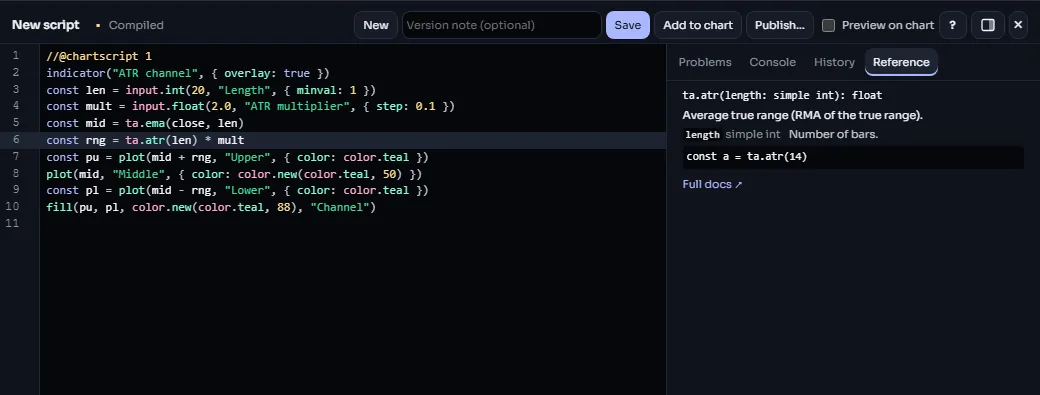
How to read a signature: ta.ema(source, length) means the function takes a series to average and a length. Parameters with a default, such as minval on input.int, can be left out; give them by name, in an options object at the end of the call, when you want them ({ minval: 1 }). When a page says a value must be "a constant or an input", it means the value cannot change from bar to bar: the series and qualifiers page explains why.
#Read the official scripts
ChartDeck's own built-in indicators have open ChartScript twins, the official scripts: from RSI, MACD and Bollinger Bands to Supertrend and Ichimoku cloud, and the indicators that draw on the chart, such as pivot points, session ranges, market structure, fair value gaps and volume profiles. Each one gives the same numbers, or draws the same lines, boxes and labels, as the built-in indicator, so they are a reliable place to see how real indicators are written.
To open one:
- Add the built-in indicator to a chart, for example RSI.
- Open its settings.
- Click View source.
The script opens in the editor read-only, marked "ChartDeck official". You can read it, scroll it and press F1 on any name in it. To change it, click Make a copy to edit: a copy goes into My scripts and opens as your own script, ready to change and save. The official scripts are open source under the MPL-2.0 license, and your copy keeps the license notice at the top, as that license requires.
Good ones to start with:
- RSI and SMA: a few lines each; the smallest complete indicators.
- MACD: three averages, a histogram whose color depends on whether it is growing or shrinking, and a zero line.
- Donchian channels: highest high, lowest low and a fill between them.
- Supertrend:
statevariables that carry state from bar to bar, and two plots that break where the trend flips. - Pivot points: levels from the previous day, week or month with
request.tf, drawn as lines and labels that one period hands over to the next. - Market structure (BOS / CHoCH): swings from
ta.pivothigh/ta.pivotlow, a user type for the latest unbroken swing, and lines and labels kept to the newest few. - Session ranges: local session times in three time zones, one box per session that grows bar by bar.
- Zigzag: a user type with methods that reads the bars one at a time, and
live stateto keep work between the ticks of the live bar. - Market profile (TPO): periods built from
request.lower_tfbars, the point of control and value area worked out with arrays on the newest bar, and the letters as one label per row. - Liquidation heatmap and Order book heatmap: ChartDeck's own data as
heatmap.columnvalues added to a heatmap, and legend keys with the palette's gradient.
All of them:
| Official script | Draws | Shows |
|---|---|---|
| MACD | values (plots) | |
| Bollinger Bands | values (plots) | |
| Supertrend | values (plots) | state |
| ADX / DMI | values (plots) | state |
| Heikin Ashi (smoothed) | values (plots) | state |
| Ichimoku cloud | values (plots) | functions |
| RSI | values (plots) | |
| EMA | values (plots) | |
| SMA | values (plots) | |
| Stoch RSI | values (plots) | |
| Moving average | values (plots) | |
| Average true range (ATR) | values (plots) | |
| Squeeze momentum | values (plots) | |
| WaveTrend | values (plots) | |
| Keltner channels | values (plots) | |
| Donchian channels | values (plots) | |
| Parabolic SAR | values (plots) | |
| Stochastic | values (plots) | |
| On-balance volume (OBV) | values (plots) | |
| Money flow index (MFI) | values (plots) | |
| CCI | values (plots) | |
| Chandelier exit | values (plots) | state |
| Chaikin money flow (CMF) | values (plots) | |
| Williams %R | values (plots) | |
| Bollinger %B | values (plots) | |
| Bollinger bandwidth | values (plots) | |
| Rate of change (ROC) | values (plots) | |
| Momentum | values (plots) | |
| Awesome oscillator | values (plots) | |
| TRIX | values (plots) | |
| VWAP | values (plots) | functions, state |
| VWAP + deviation bands | values (plots) | functions, state |
| Anchored VWAP | values (plots) and drawings (polyline) | user types, methods, functions, for…of, state |
| Fixed range volume profile | drawings (line, label, box) | functions, for…of, state |
| Anchored volume profile | drawings (line, label, box) | functions, for…of, state |
| Pivot points | drawings (line, label) | higher timeframes (request.tf), user types, functions, for…of, state |
| Previous day / week / month levels | drawings (line, label) | higher timeframes (request.tf), user types, methods, functions, for…of, state |
| Session ranges | drawings (line, box) | functions, for…of, state |
| Linear regression channel | drawings (line, linefill) | state |
| Zigzag | drawings (line, label) | higher timeframes (request.tf), user types, methods, functions, for…of, live state |
| Williams fractals | values (plots) | |
| Market structure (BOS / CHoCH) | drawings (line, label) | user types, methods, state |
| Fair value gaps | drawings (box) | user types, functions, for…of, state |
| Order blocks | drawings (box) | user types, for…of, state |
| Liquidity sweeps | drawings (line, label) | user types, methods, functions, for…of, state |
| Divergences | drawings (line, label) | user types, functions, state |
| Auto Fibonacci retracement | drawings (line, label, box) | higher timeframes (request.tf), user types, methods, functions, for…of, state |
| Volume | values (plots) | state |
| CVD | values (plots) | |
| Volume delta | values (plots) | |
| Bar statistics | values (plots) | state |
| Volume profile (approx.) | drawings (line, label, box) | functions, for…of, state |
| Open interest | values (plots) | |
| OI delta | values (plots) | |
| Aggregated open interest | values (plots) | |
| OI / price regime | values (plots) and drawings (label, box) | functions, for…of, state |
| Funding rate | values (plots) | |
| Aggregated funding | values (plots) | |
| Perp/spot basis | values (plots) | |
| Coinbase premium | values (plots) | |
| Long/short ratio | values (plots) | |
| Liquidations | values (plots) | |
| ETF net flows | values (plots) | |
| Market profile (TPO) | drawings (line, label, box) | lower timeframes (request.lower_tf), legend items, user types, functions, for…of, state |
| Large prints | drawings (label) | trade prints (flow.prints), legend items, functions, for…of, state |
| Liquidation levels | drawings (line, label) | liquidation levels (liq.levels), legend items, user types, functions, for…of, state |
| Liquidation heatmap | drawings (heatmap) | liquidation heat (liq.heat), legend items, functions, for…of, state |
| Order book heatmap | drawings (line, label, box, heatmap) | the recorded order book (book.heat), legend items, functions, for…of, state |
#Start from a starter
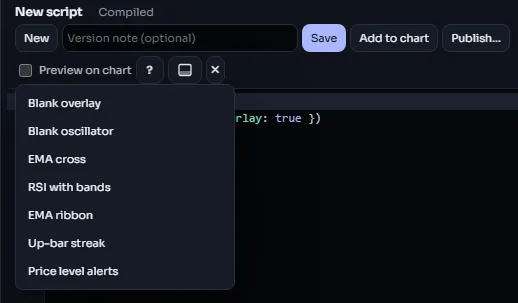
New in the editor offers a short list of starters: a blank overlay, a blank oscillator, an EMA cross with an alert, RSI with bands, an EMA ribbon, an up-bar streak counter and a price-level alert. Each is a small, working script. Starting from the nearest one is usually faster than starting from an empty page.
#Learn the language properly
Once you have built two or three things, read the language section from the start. It is short, and it explains things the tutorials only touch on:
- Execution model: how the script runs bar by bar, and on the live bar.
- Variables:
const,let,stateand assignment with=. - Functions: writing your own.
- Collections: arrays, maps and matrices.
The concepts section covers each kind of output in detail: plots, fills, levels, text and shapes, drawings, tables and alerts.
When something does not do what you expect, Debugging shows how to print values to the Console tab, and the style guide helps keep a growing script readable.
#Learn from the Community
Members publish their own scripts to the Community. Open the Indicators dialog, choose Community and then the Scripts tab to browse them, sorted by trending, most liked, most discussed or newest.
- An open-source script has a View source button: read it the same way as an official script, and use Make a copy to get your own copy. The author's license and a credit line come with it.
- A protected script runs on your chart, but its author keeps the source hidden, so it cannot be viewed or copied.
Reading other people's scripts is one of the best ways to pick up idioms. Please respect each script's license, and read the community rules before you publish your own. When you are ready, Publishing walks you through it.
#One more small script
Here is a small script that uses several ideas from the tutorials at once. Paste it into the editor, then use F1 on each name you do not know yet.
//@chartscript 1
indicator("Distance from average", { shorttitle: "Dist", overlay: false, precision: 2 })
const len = input.int(50, "Average length", { minval: 1 })
const avg = ta.ema(close, len)
const dist = (close - avg) / avg * 100
plot(dist, "Distance %", dist >= 0 ? color.up : color.down, { style: plot.style_columns })
hline(0, "Zero", color.muted)
It shows how far the close is from its 50-bar EMA, in percent, as green and red columns in a pane of its own.