

Publishing
An overview of sharing a ChartScript script with the Community - public or invite-only, open or protected source, licenses and updates.
Your scripts are private until you decide otherwise. Publishing shares one of them in Community > Scripts, where other members can find it and add it to their charts. This page is a short overview; Publishing and licenses and Visibility and protection go into detail.
#Where to publish from
- In the editor: Publish… in the tools row (on a phone, in the ⋯ menu).
- In Indicators > My scripts: the script's ⋯ menu, Publish to the Community….
You always publish a saved version. If the editor has unsaved changes, it saves them first. A version with errors cannot be published.
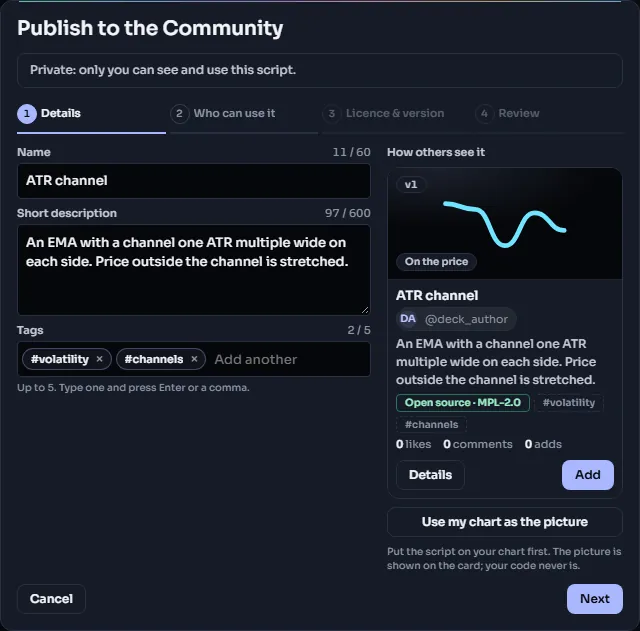
#What you fill in
The dialog takes you through four short steps. Next checks each step before moving on, Back keeps what you entered, and the numbers at the top take you back to any step you have done.
- Details: Name (3 to 60 characters), a short Description (up to 600 characters) and up to 5 Tags. Tags come from a fixed list of about 50 (trend, oscillator, open interest, alerts and so on): search the list or pick from its groups, or click one of the Suggested tags, which ChartDeck reads from your script's name, description and code. You cannot type a tag of your own. The name and description are plain text: no links, @mentions or contact details. A preview shows the Community card as others will see it.
- Who can use it: who can find the script, and whether they can see its code.
- License & version: the License for open-source scripts, and the Version others run.
- Review: everything on one page with an Edit link per step. Tick "I wrote this or have the right to share it", then click Publish.
A published script opens straight on Review, with Unpublish at the bottom.
#Visibility: two choices
Visibility combines two choices, which gives four kinds of listing.
Audience
- Public: listed in the Community, in search and on your profile. Anyone signed in can add it.
- Invite-only: only members you add by @handle, or who use your invite link, can add it. It is not listed anywhere, unless you tick Show it in the Community: then everyone can see its card and ask you for access, but only the members you let in can add it or see its code.
Source
- Open source: people who can use the script can also read its code and make their own copy under your license.
- Protected source: people can add the script to their charts, but ChartDeck never shows them the code or lets them copy it.
| Open source | Protected source | |
|---|---|---|
| Public | Public · open | Public · protected |
| Invite-only | Invite-only · open | Invite-only · protected |
A protected script runs on ChartDeck's servers for everyone who adds it, and their charts receive only the values to draw. That is how the code stays private. How often a protected script updates within an open bar depends on the viewer's plan; every bar close is always shown. See Limits.
#Licenses
An open-source script needs a license, which tells others what they may do with a copy:
| License | In short |
|---|---|
| MPL-2.0 (recommended, the default) | Others may copy and change it; changed copies of the file stay open under MPL-2.0, with your credit. |
| MIT | Others may do anything with it, closed copies too, as long as your copyright notice stays. |
| Apache-2.0 | Like MIT, plus an explicit patent grant; changed files must say they were changed. |
| CC-BY-4.0 | Others may share and adapt it if they credit you. Made for content more than code. |
A protected script is "All rights reserved". If your script is a copy of an open-source script (a Community script or one of ChartDeck's official ones), its license travels with the code: it is fixed, and the script must stay open source.
#Updating and unpublishing
Publishing shares one version. When you save new versions, they stay private: members keep running the published version until you open the dialog again (the editor's button then reads Published ✓, the menu reads Published: update or unpublish…), choose the newer version and click Update. My scripts and the History tab show which version is published.
Unpublish makes the script private again. It leaves the Community, and charts that already have it show "Script not available". You can publish it again later.
#Before you publish
A few rules keep the Community useful. The dialog checks most of them for you:
- Your public profile must be on, your email address verified, and your account at least a day old.
- You can publish up to 5 new scripts a day.
- Only share what you wrote or have the right to share. A copy of someone else's script must change the logic before you publish it: renaming, recoloring or new defaults are not enough.
- No profit promises, win-rate claims or advertising for signal services.
- Members can report a script; three reports hide it until a moderator reviews it.
- Libraries, and scripts that import libraries, cannot be published yet.
Read Community rules for the full rules.
#Adding other members' scripts
Published scripts appear in Indicators > Community > Scripts. Add one to your chart like any indicator. With an open-source script you can also open its code read-only in the editor and Make a copy to edit in your own scripts, under its license.
A script worth sharing is usually a clean, well-labeled one. This small example has tidy inputs, titles on every output and sensible defaults:
//@chartscript 1
indicator("Range expansion", { shorttitle: "RangeX" })
const length = input.int(14, "Average length", { minval: 1, tooltip: "Bars used for the average range" })
const r = (high - low) / ta.sma(high - low, length)
plot(r, "Range ratio", r > 1 ? color.up : color.muted, { style: plot.style_columns })
hline(1, "Average", color.muted, hline.style_dotted)