

Publishing and licenses
Publish a ChartScript script, choose its license and the version others run, update or unpublish it, and copy open-source scripts the right way.
Publishing shares one of your scripts with other ChartDeck members. A published script gets a card in Indicators > Community > Scripts, appears on your public profile, and can be added to anyone's chart, liked, boosted and discussed. This page covers the publish dialog, licenses, updates, copies and the rule that a copy must really change the code before it can be published.
Who can see the script and whether they can read its source is a separate choice, explained in Visibility and protection. For the short version of the steps, see Publishing in Getting started.
#Before you publish
Publishing is open on every plan. ChartDeck asks for a few things first, to keep the Community free of throwaway spam accounts:
- A public profile. Your scripts show on it and every card shows your @handle. If yours is not public yet, the dialog says so at the top and offers Set up your profile; once you have made it public, click I made it public: check again.
- A verified email address.
- An account at least a day old.
- Publishing must not be turned off for your account (members blocked from commenting cannot publish either).
There are also two rate limits: at most 5 new scripts a day (updates of a script you already published do not count) and 20 publish actions an hour (publish, update or unpublish).
Two kinds of script cannot be published yet: libraries, and scripts that import a library (other members could not load the library).
The version you publish must compile without errors. Fix any errors, save, and then publish.
#The publish dialog
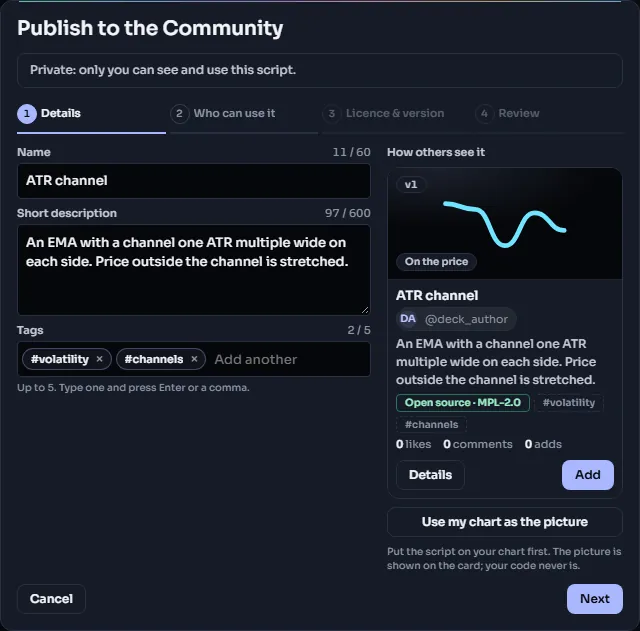
Open it from Indicators > My scripts: choose Publish to the Community… in the script's menu. In the editor, the Publish… button opens the same dialog for the script you are editing (save it first).
The dialog has four steps: Details (name, description, tags), Who can use it (visibility), License & version, and Review. Use Next and Back to move between them; nothing you entered is lost when you go back, and an unfinished dialog is kept as a draft until you close the tab. If the server refuses something, for example a link in the description, the dialog goes back to that step and marks the field.
| Field | What to put there |
|---|---|
| Name | 3 to 60 characters. It is the card's title. |
| Description | What the script shows and how you use it, up to 600 characters of plain text. |
| Tags | Up to 5, picked from a fixed list of about 50 in five groups (indicator type, price action & structure, market data, use, market). Search the list by name or by a common abbreviation (ema finds Moving average), or click a Suggested tag: suggestions are read from your script's name, description and code, and are never added by themselves. A tag that is not on the list cannot be entered. The Community can be filtered by tag. |
| Visibility | Public or Invite-only, with Open or Protected source; an invite-only script can also be shown in the Community with a "How to get access" note. See Visibility and protection. |
| License | For open source: the terms others may use your code under (next section). Protected scripts are "All rights reserved". |
| Version others run | Which saved version people get. The newest is chosen for you; any older version is in the list, with its note. |
On Review you tick "I wrote this or have the right to share it." (for a script brought in with Import, the box adds "Its original license header stays in the source."). The content rules are folded under Community rules (see Community rules). Click Publish, and the script is live in the Community at once.
#Text rules for the name and description
These fields are checked when you publish, and a refused field gets its reason right next to it. They must be plain text with:
- no links or web addresses,
- no @mentions, email addresses or phone numbers,
- no invitations to other chats or requests to message you,
- no HTML or markup,
- no offensive language,
- no profit promises or win-rate claims ("guaranteed", "risk-free", "90% win rate", "never loses" and the like).
The description is the place to explain the idea behind the script and how to read it. It is not the place to sell anything.
#Licenses
An open-source script is published under a license: the terms on which other members may read, copy and change your code. The dialog offers four:
| License | In one line |
|---|---|
| MPL-2.0 (recommended, the default) | Others may copy and change it; changed copies of this file stay open under MPL-2.0 with your credit. |
| MIT | Others may do anything with it, closed copies too, as long as your copyright notice stays. |
| Apache-2.0 | Like MIT, plus an explicit patent grant; changed files must say they were changed. |
| CC-BY-4.0 | Others may share and adapt it for any purpose if they credit you. Made for content, less for code. |
ChartDeck's own official scripts are published under MPL-2.0, and it is a good default for yours: anyone can learn from and build on your script, and improvements to it stay open and credit you.
A protected script has no open license: its card says "All rights reserved", nobody else sees the source and nobody can copy it.
#Licenses that travel with the code
Some scripts carry their license with them, and the dialog shows it fixed ("travels with the code"):
- a copy of one of ChartDeck's official scripts (MPL-2.0),
- a copy of another member's open-source Community script (its author's license),
- an imported script whose source came with a license header.
You cannot change that license, and you cannot publish such a script as protected: the dialog grays out the protected column and says why. For an imported script, the original license header must still be at the top of the published version; if it is gone, publishing asks you to put it back.
#Updating a published script
Saving a new version does not change what others run. Members always get the published version; your newer saves stay private until you publish them. That lets you keep working on a script without breaking anyone's chart.
To update, open the dialog again (Published: update or unpublish… in the script's menu, or Publish… in the editor). It opens on Review, with an Edit link for each step and Unpublish at the bottom. The top line shows where you stand, for example "Published: others run version 3 (your latest is 5)". Choose the version in Version others run, change the name, description, tags or visibility if you like, and click Update. Members' charts pick up the new version.
You can also point the published version back to an older one, if a new version turns out to have a problem.
#Unpublishing
Unpublish (in the same dialog) makes the script private again, after you confirm. It leaves the Community, search and your profile, and members can no longer add it. On charts that already had it, it stops running: its legend row stays, marked "Disabled – removed from the Community", with a button to remove it.
You can publish it again later.
#Making a copy of an open-source script
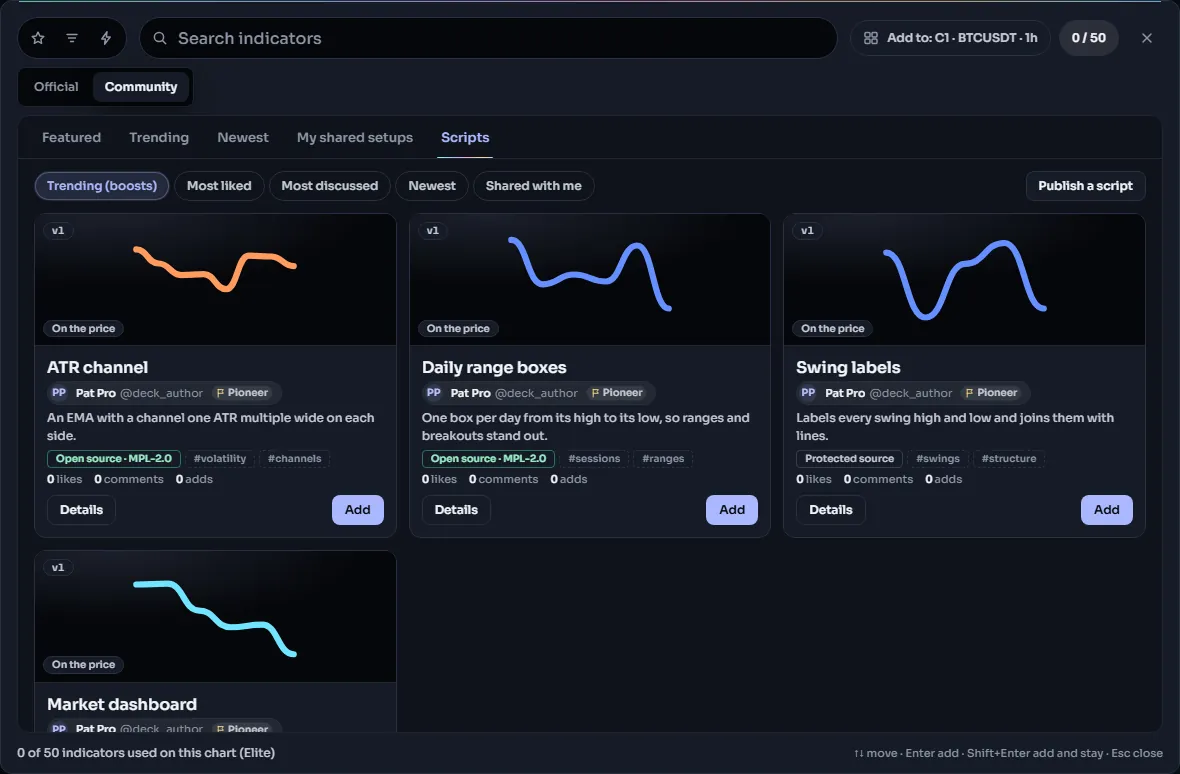
Click an open-source script's card in Community > Scripts to open its details: View source opens it read-only in the editor and Make a copy saves a copy into My scripts. For ChartDeck's official scripts, open the built-in indicator's settings on your chart and click View source; the read-only editor offers Make a copy too. A copy:
- keeps the original's license header and license, which then travel with it,
- gets an attribution line right after the header, such as
// Copied from "RSI" v1 by @chartdeck (MPL-2.0), - counts towards the number of scripts your plan lets you keep.
Keep both the header and the attribution line. They are how the license and the credit stay attached to the code.
Protected scripts cannot be copied.
#The copies rule: change the logic first
You may publish a copy of someone else's script, even publicly, but only once you have meaningfully changed what it calculates. A copy that only looks different would bury the original under clones, so ChartDeck compares the logic of your copy with the original when you publish.
What does not count as a change, because the comparison ignores it:
- renaming variables or functions,
- changing titles, labels or other text,
- changing colors, line widths or styles,
- changing input defaults, bounds or level numbers,
- adding, removing or editing comments (including the license header),
- spacing and blank lines.
What does count: new or different calculations, conditions, filters and plots. A copy must differ from the original by a handful of these "logic" pieces: 15% of the original's size, at least 6 and at most 10 of them. One new condition with its own ta.* value, or one new plot of a new calculation, is usually enough; reordering arguments or adding and close > open to an existing condition usually is not.
If your copy is too close, publishing is refused with: "Your copy is too close to @author's original. Change the logic before publishing - renaming, recoloring or new defaults are not enough." The comparison is made against both the version you copied and the original's current published version.
The rule also applies when code is pasted rather than copied: a script whose logic matches another member's published script, or an official script, cannot be published as new. Very short scripts are exempt, because two people can easily write the same three lines.
Here is a copy of the official RSI script that passes. It keeps the header and attribution line, and adds a trend filter and a new marker:
//@chartscript 1
// SPDX-License-Identifier: MPL-2.0
// Copyright (c) 2026 ChartDeck
// This Source Code Form is subject to the terms of the Mozilla Public License, v. 2.0. If a copy of the MPL was not
// distributed with this file, You can obtain one at https://mozilla.org/MPL/2.0/.
// Copied from "RSI" v1 by @chartdeck (MPL-2.0)
//
// Changed by Your Name: RSI shown only while the close is above its 50-bar average, with a mark
// where it leaves the oversold zone in an uptrend.
indicator("RSI in uptrends", { overlay: false })
const len = input.int(14, "Length", { minval: 1, maxval: 500 })
const src = input.source(close, "Source")
const trendLen = input.int(50, "Trend length", { minval: 2, maxval: 500 })

const r = ta.rsi(src, len)
const upTrend = close > ta.sma(close, trendLen)
const leavesOversold = ta.crossover(r, 30)
plot(upTrend ? r : na, "RSI", color.purple, 2, plot.style_linebr)
plotshape(upTrend && leavesOversold, "Leaves oversold", shape.circle, location.bottom, color.up, { size: size.tiny })
hline(70, "Upper", color.muted, hline.style_dashed)
hline(30, "Lower", color.muted, hline.style_dashed)
Because it is a copy of an MPL-2.0 script, it stays MPL-2.0 and open source.
#See also
- Visibility and protection: Public or Invite-only, Open or Protected.
- Community rules: what is allowed, reports and moderation.
- Saving and versions: how versions work.